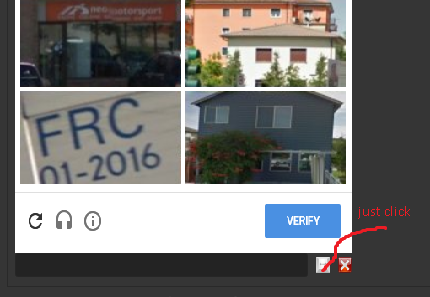

@BAS-Viet-Nam Thanks for responding. I thought it can be handled by using a Javascript code
recaptcha 2 manual fails
-
Does manual recpatcha 2.0 work? How do you manually click the images?
I click the recaptcha box. Select "solve recaptcha 2.0" from the popup dialog box. I don't change any settings. Leave it set to manual.
Save.
Run.
Once it gets to the captcha step it automatically clicks "I am not a robot".
The verify pop up appears, asking question similar to "click all images containing mountains".
Nothing else happens. I can't manually click anything and it doesn't automatically click anything else. Just hangs.Thanks. Great program
-
OK. I found that. I see the grid image. I can't click anything in it so I tried typing the number of the boxes in the grid. Top left box = 1. Bottom right box = 8. That caused the automated mouse to move and click on the selected boxes. The clicked box would get a check mark but then the image would fade to white, change to a new image and the check would go away. The automated mouse never clicked the verify button to complete the process.
-
The correct image ("mountains" or whatever) do appear in the grid. I enter numbers = grid location. Press enter. The mouse then moves to the grid location and clicks the correct image.
But 2 problems.
-
When the image is clicked it first gets a checkmark (as it should) but then the clicked image fades to white and the checkmark and image disappear then image fades back in as a new image with no checkmark. The mouse then proceeds to the next image to be clicked and same fading happens again.
-
The verify button is not clicked.
Thank you for help!
-
-
Thanks but you are misunderstanding my problem.
There ARE pictures to click.
I type the correct grid numbers in the input box to the left of the "just click" button you highlighted.
I then click the button you highlighted.
The auto mouse then clicks the correct grid numbers.When the automouse clicks those boxes they first correctly receive a check mark
BUT then the selected box incorrectly fades away and loses the check mark.
AND the automosue doesn't do the final step - click the green verifiy button which is shown just above the "just click" button you highlighted.
