
Добавил еще ведущие нули к миллисекундам, если кому-то еще когда-то этот код понадобится
log = function (text, color, define){ var id, time, thread, logHtml, textLog; define = (typeof define == 'string') ? define.split(/[\s,.|:;]+/g) : define; if(typeof define === 'object' && define !== null){ if(Array.isArray(define)){ id = define.indexOf('id') > -1; time = define.indexOf('time') > -1; thread = define.indexOf('thread') > -1; } else{ id = define.id == true; time = define.time == true; thread = define.thread == true; } } else id = time = thread = true; id = id ? '<a href="action://action' + ScriptWorker.GetCurrentAction() + '" style="color:gray;">[' + ScriptWorker.GetCurrentAction() + ']</a>' : ''; time = time ? ' ' + getTime() : ''; thread = thread ? ' Поток №' + thread_number() : ''; logHtml = (id || time || thread) ? id + '<span style="color: white">' + time + thread + ' : </span>' : ''; logHtml += '<span style="color:' + (color ? color : 'white') + '">' + text + '</span>'; textLog = '[' + ScriptWorker.GetCurrentAction() + ']' + time + thread + ' : ' + text function getTime(){ var checkTime = function(i){ return (i < 10) ? "0" + i : i; }; var checkMilliSeconds = function(ms){ if (ms < 10) { return "00" + ms; } else if (ms < 100) { return "0" + ms; } else { return ms; } }; var d = new Date(); var hh = checkTime(d.getHours()); var mm = checkTime(d.getMinutes()); var ss = checkTime(d.getSeconds()); var ms = checkMilliSeconds(d.getMilliseconds()); return '[' + hh + ':' + mm + ':' + ss + '.' + ms + ']'; }; Logger.WriteHtml(logHtml, textLog); }Выбрать завтрашнюю дату в календаре
Moved
Поддержка
-
F Fox moved this topic from Support on
-
@DuckDuck
Благодарю за ответ!
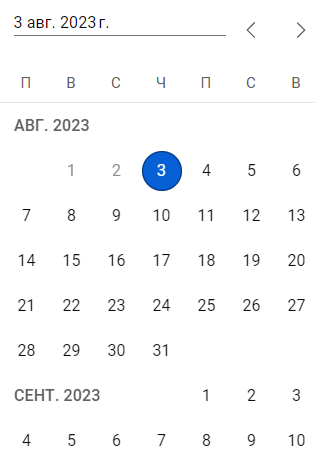
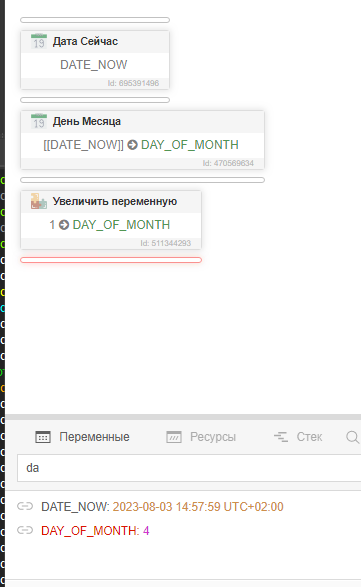
Думал, что может есть другое решение, кроме изменения даты таким способом, которое бы работало напрямую с календарём и тем самым учитывало момент смены месяца на следующий.
Но, за неимением и такой вариант подходит, спасибо.Теперь появилась другая проблема - в поле ввода текста, для применения введенной даты, подтвердить её можно только нажатием кнопки Enter вручную. В тоже время в скрипте "Ввод текста" нажатие кнопки Enter (<RETURN>) не срабатывает по непонятным для меня причинам. Не знаете как это можно решить?

