How to get discord token 2025?
-
Old javascript didnt work
[[TOKEN]] = (webpackChunkdiscord_app.push([[''],{},e=>{m=[];for(let c in e.c)m.push(e.c[c])}]),m).find(m=>m?.exports?.default?.getToken!==void 0).exports.default.getToken()any update?
-
Load discord.com/app
Run javascript
////////////////////////////////////////////////////////
function startApiLogger() {
if (window.apiLoggerStarted) return console.warn('API Logger đã được khởi động trước đó.');window.apiLogs = [];
window.apiLoggerStarted = true;// --- Ghi lại các fetch() ---
const originalFetch = window.fetch;
window.fetch = async (...args) => {
const log = {
type: 'fetch',
method: args[1]?.method || 'GET',
url: args[0],
requestBody: args[1]?.body || null,
timestamp: new Date().toISOString()
};
const response = await originalFetch(...args);
const clone = response.clone();
clone.text().then(body => {
log.status = clone.status;
log.response = body;
window.apiLogs.push(log);
}).catch(() => {
log.response = '[Error reading response]';
window.apiLogs.push(log);
});
return response;
};// --- Ghi lại XMLHttpRequest ---
const OriginalXHR = window.XMLHttpRequest;
window.XMLHttpRequest = class extends OriginalXHR {
constructor() {
super();
this._requestInfo = {};const originalOpen = this.open; this.open = function (method, url, ...rest) { this._requestInfo.method = method; this._requestInfo.url = url; return originalOpen.call(this, method, url, ...rest); }; const originalSend = this.send; this.send = function (body) { this._requestInfo.requestBody = body; this.addEventListener('load', () => { window.apiLogs.push({ type: 'xhr', method: this._requestInfo.method, url: this._requestInfo.url, requestBody: this._requestInfo.requestBody || null, status: this.status, response: this.responseText, timestamp: new Date().toISOString() }); }); return originalSend.call(this, body); }; }};
console.log('✅ API Logger (XHR + Fetch), log trong window.apiLogs');
}startApiLogger();
////////////////////////////////////////////////////////
click DM on discord
Run javascript
////////////////////////////////////////////////////////
const tokens = [];for (const log of window.apiLogs) {
if (
log.requestBody &&
typeof log.requestBody === 'string' &&
log.requestBody.includes('"token":"')
) {
try {
const body = JSON.parse(log.requestBody);
if (body.token) {
tokens.push(body.token);
}
} catch (e) {
// Bỏ qua log lỗi nếu JSON.parse fail
}
}
}[[TOKEN]] = [...new Set(tokens)]
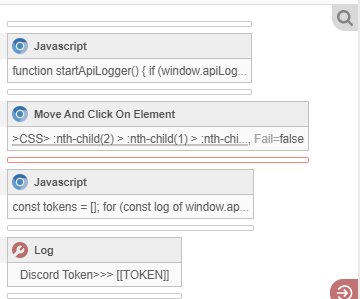
////////////////////////////////////////////////////////
-
-
@mtrsu4484
I updated the code, tested it, I confused between different tokensLoad discord.com/app
Run javascript
////////////////////////////////////////////////////////
function startApiLogger() {
if (window.apiLoggerStarted) return console.warn('API Logger on.');window.apiLogs = [];
window.apiLoggerStarted = true;// --- Ghi lại các fetch() ---
const originalFetch = window.fetch;
window.fetch = async (...args) => {
const method = args[1]?.method || 'GET';
const url = args[0];let headers = args[1]?.headers || {};
if (headers instanceof Headers) {
const temp = {};
headers.forEach((v, k) => temp[k] = v);
headers = temp;
}const log = {
type: 'fetch',
method,
url,
requestHeaders: headers,
requestBody: args[1]?.body || null,
timestamp: new Date().toISOString()
};const response = await originalFetch(...args);
const clone = response.clone();clone.text().then(body => {
log.status = clone.status;
log.response = body;
window.apiLogs.push(log);
}).catch(() => {
log.status = clone.status;
log.response = '[Error reading response]';
window.apiLogs.push(log);
});return response;
};// --- record XMLHttpRequest ---
const OriginalXHR = window.XMLHttpRequest;
window.XMLHttpRequest = class extends OriginalXHR {
constructor() {
super();
this._requestInfo = {
headers: {}
};const originalOpen = this.open; this.open = function (method, url, ...rest) { this._requestInfo.method = method; this._requestInfo.url = url; return originalOpen.call(this, method, url, ...rest); }; const originalSetHeader = this.setRequestHeader; this.setRequestHeader = function (key, value) { this._requestInfo.headers[key] = value; return originalSetHeader.call(this, key, value); }; const originalSend = this.send; this.send = function (body) { this._requestInfo.requestBody = body; this.addEventListener('load', () => { window.apiLogs.push({ type: 'xhr', method: this._requestInfo.method, url: this._requestInfo.url, requestHeaders: this._requestInfo.headers, requestBody: this._requestInfo.requestBody || null, status: this.status, response: this.responseText, timestamp: new Date().toISOString() }); }); return originalSend.call(this, body); }; }};
console.log('✅ API Logger on (XHR + Fetch), log trong window.apiLogs');
}startApiLogger();
////////////////////////////////////////////////////////
click DM on discord
Run javascript
////////////////////////////////////////////////////////
[[TOKEN]] = [...new Set(
window.apiLogs
.map(log => {
const auth = log?.requestHeaders?.Authorization || log?.requestHeaders?.authorization;
return (typeof auth === 'string' && auth.split('.').length === 3 && auth.length > 60) ? auth : null;
})
.filter(Boolean)
)];
//////////////////////////////////////////////////////// -