@hellomembersha
document.querySelector('[name=g-recaptcha-response]').innerText = [[TOKEN_CAPTCHA]];
document.querySelector('[name=h-captcha-response]').innerText = [[TOKEN_CAPTCHA]];
FINGERPRINT - Callback is empty. Did you forget to use '!' after function?
-
окей, я почитал нмного форум и увидел проблему у некоторых.
а именно "Callback is empty. Did you forget to use '!' after function?" у "Применить отпечаток"
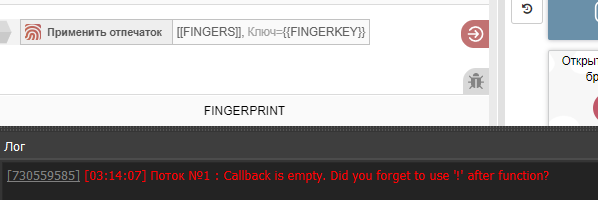
не знаю , почитал информацию про вызов через функцию тут (https://community.bablosoft.com/topic/5037/ошибка-при-запуске/4), но это тоже не помогло.
на старых версиях не замечал такой проблемы, если я удаляю действие "Применить отпечаток" то все работает гуд.
И кстати хоть и пишет что эта ошибка "Callback is empty. Did you forget to use '!' after function?", но отпечаток применяется. лол.
можно как-то быстро решить этот вопрос? может в отпечатке заменить все { } на что-то другое? (как я понял проблема именно в нем?)
-
8244dc9a-f7d2-42b8-aca3-f39595ac20c0-image.png
Click the Save As button to save it as a different file. Then, when you look at the modules section of the project you saved as a different file, you will see that the fingerprint switcher module is not there.In order:
Install the module
In the file field,
type %APPDATA%
Find BrowserAutomationStudio in the folder that opens
Enter the apps folder and enter the folder with the latest version.
Enter the modules folder, right-click on the FingerPrintSwicher module, zip it, install the zipped module, and after starting the project, delete the fingerprint and recreate it.
Then, don't forget to perform the update project action.If you don't perform the project action update, you will get the same error when you compile.
Also, if you'd like to join, I have a Telegram group where I try to help everyone:
We'd be happy if you join :)
-
@loppener said in FINGERPRINT - Callback is empty. Did you forget to use '!' after function?:
окей, я почитал нмного форум и увидел проблему у некоторых.
а именно "Callback is empty. Did you forget to use '!' after function?" у "Применить отпечаток"
не знаю , почитал информацию про вызов через функцию тут (https://community.bablosoft.com/topic/5037/ошибка-при-запуске/4), но это тоже не помогло.
на старых версиях не замечал такой проблемы, если я удаляю действие "Применить отпечаток" то все работает гуд.
И кстати хоть и пишет что эта ошибка "Callback is empty. Did you forget to use '!' after function?", но отпечаток применяется. лол.
можно как-то быстро решить этот вопрос? может в отпечатке заменить все { } на что-то другое? (как я понял проблема именно в нем?)
Приложите скриншот содержимого этого действия
-
@tersinemuhendis спасибо, это действительно решило проблему.