






I believe you need to convert the cookies to the format that BAS understands, and then import them into BAS using a standard method.
Take a look:
https://chromedevtools.github.io/devtools-protocol/tot/Network/#type-Cookie
were you able to figure this out? I have already tried [[Varname]] = objectToSave
@janekorec said in How can i save my nodejs variable, to a "BAS" variable?:
+1 same problem, not enough wiki
The usual assignment by value works
[[NEW_VARIABLE]] = "hello world"
but the data between BAS and nodejs is transmitted in serialized form
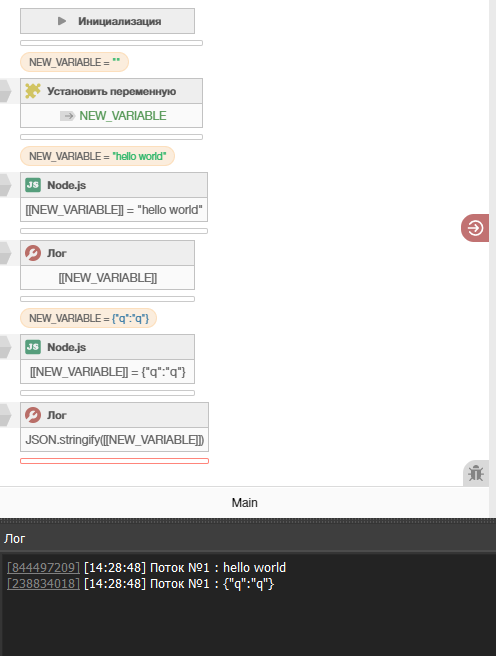
Before you start the Node.js part, drop helper functions into Tools > Execute Code :
setGlobalVar = function () {
    var args = _function_arguments();
    var name = Object.keys(args)[0];
    PSet("basglobal", name, JSON.stringify(args[name]));
};

getGlobalVar = function() {
    var name = _function_arguments();
    var result = JSON.parse(P("basglobal", JSON.stringify(name)) || '""')
    _function_return(result)
}
Next time, use them in your Node.js code like this:
await BAS_FUNCTION("setGlobalVar", {"TEST": 2})

var value = await BAS_FUNCTION("getGlobalVar", "TEST")
console.log(value)


await BAS_FUNCTION("setGlobalVar", {"TEST2": 222222})
The variable inspector doesn’t see them, but they do exist!


