


@bakrimobi Try: https://docs.capsolver.com/en/guide/recognition/AwsWafClassification/
very tired save cookies to txt file not work anyone cant help me?
-
im very tired save cookies to txt file not work anyone cant help me?
im search all discusion not have complete tutorial i dont know what happen
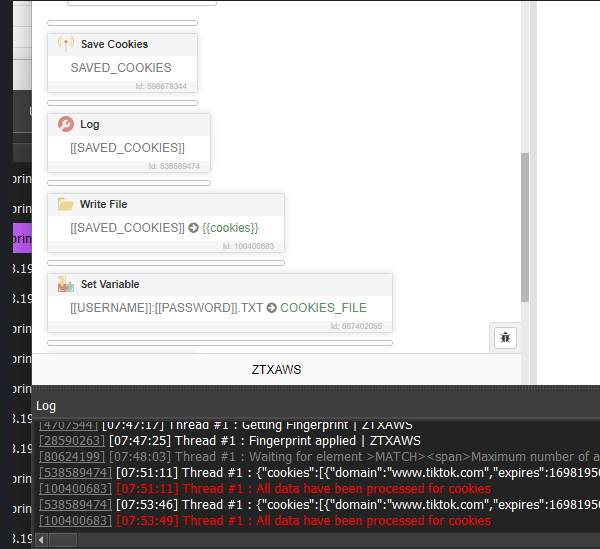
i will pay if you want anydesk or teamviewer for help me, thanks -
Try to serialize cookies before saving them and deserialize after reading content from a file using JSON.stringify and JSON.parse.
-
@internetsuper said in very tired save cookies to txt file not work anyone cant help me?:
im very tired save cookies to txt file not work anyone cant help me?
im search all discusion not have complete tutorial i dont know what happen
i will pay if you want anydesk or teamviewer for help me, thanksThe {{cookies}} resource contains the contents of the file that you specified at the start of work, and not the path to the file. In the action "Write File" you need to specify the path to the file, you can get the path to the file specified in the resources using the action "Resource Location"
-
@Fox arleady resource directory but still not work to write file username.txt cookies result
can you give me screenshot for this tutor? thanks -
@internetsuper said in very tired save cookies to txt file not work anyone cant help me?:
@Fox arleady resource directory but still not work to write file username.txt cookies result
can you give me screenshot for this tutor? thanksIt depends on what exactly you want to do. For example, here is a script in which you need to specify the directory in which text files with the account name will be saved: 2801.xml
Here is the script for downloading these previously saved cookies: 2802.xml
Here is a script for downloading cookie accounts by their name: 2803.xml
-
@Fox wow its work my friend
can you giveme wallet usdt trc20, i want to give donate for help me very very thankyou -
@internetsuper said in very tired save cookies to txt file not work anyone cant help me?:
@Fox wow its work my friend
can you giveme wallet usdt trc20, i want to give donate for help me very very thankyouI didn't spend much time on it, but thanks, sent the wallet address to you in a pm