


Fox прав и вот что ещё за Папками последует, весь Скрипт целиком :)
node.js | в каком месте поставить синхронизацию кода?
-
Нужно чтобы при выполнения действия "Воспроизвести Node.js код", этот элемент выполнялся до того момента пока сам node.js код не закончится, но так как код асинхронный , это действие срабатывает мгновенно. В каком месте поставить Синхронизацию чтобы все работало как я описал?
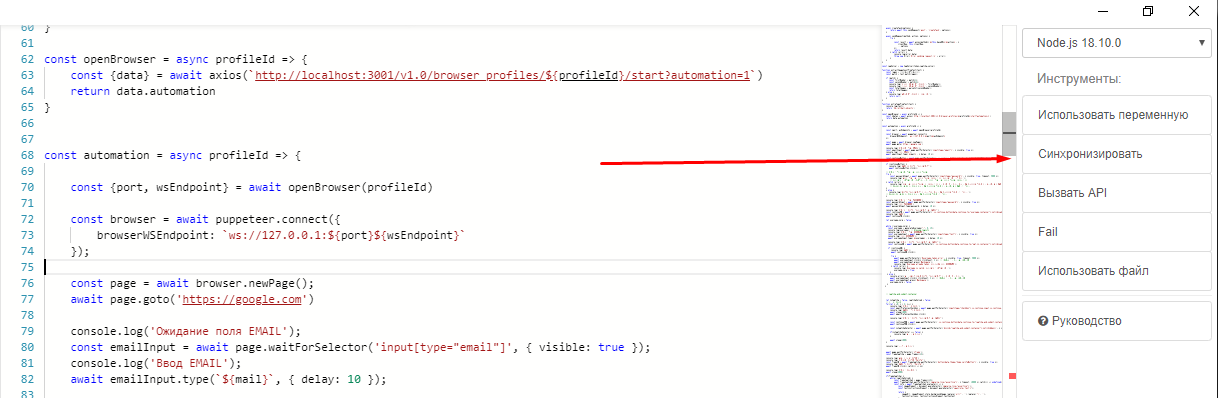
Мой код:const puppeteer = require('puppeteer') const axios = require('axios') const fs =require('fs') const sleep = ms => new Promise(resolve => setTimeout(resolve, ms)) const mail = [[LOGIN_MAIL]] const password = [[PASSWORD_MAIL]] const openBrowser = async profileId => { const {data} = await axios(`http://localhost:3001/v1.0/browser_profiles/${profileId}/start?automation=1`) return data.automation } const automation = async profileId => { const {port, wsEndpoint} = await openBrowser(profileId) const browser = await puppeteer.connect({ browserWSEndpoint: `ws://127.0.0.1:${port}${wsEndpoint}` }); const page = await browser.newPage(); await page.goto('https://google.com') console.log('Ожидание поля EMAIL'); const emailInput = await page.waitForSelector('input[type="email"]', { visible: true }); console.log('Ввод EMAIL'); await emailInput.type(`${mail}`, { delay: 10 }); console.log('Ожидмаем поле PASSWORD') const passwordInput = await page.waitForSelector('input[type="password"]', { visible: true }); console.log('Ввод PASSWORD') await passwordInput.type(password, { delay: 10 }); console.log('Ожидмаем кнопку "Продолжить для клика"') const continuePB = await page.waitForSelector('.js-continue-button[data-continue-to="username-container"]:not([disabled])'); console.log('Клик') await continuePB.click() } (async () => { try { const token = 123123123 if (!token) { console.log('Токен не получен') return } const profilesId = [[ID]] await automation(profilesId) } catch (error) { console.error('Произошла ошибка:', error); } })(); -
А зачем вы используете puppeteer в BAS? Используйте действие "Загрузить"
-
-
@getreq said in node.js | в каком месте поставить синхронизацию кода?:
@Fox окно антика же в басе нельзя использовать для автоматизации :) только через модули по типу puppeteer можно связывать и как-то работать с ним
Какой антик вы используете и почему?
-
-
const puppeteer = require('puppeteer')
const axios = require('axios')
const fs =require('fs')
const sleep = ms => new Promise(resolve => setTimeout(resolve, ms))

const mail = [[LOGIN_MAIL]]
const password = [[PASSWORD_MAIL]]


const openBrowser = async profileId => {
    const {data} = await axios(`http://localhost:3001/v1.0/browser_profiles/${profileId}/start?automation=1`)
    return data.automation
}

const automation = async profileId => {

    const {port, wsEndpoint} = await openBrowser(profileId)

    const browser = await puppeteer.connect({
        browserWSEndpoint: `ws://127.0.0.1:${port}${wsEndpoint}`
    });

    const page = await browser.newPage();
    await page.goto('https://google.com')

    console.log('Ожидание поля EMAIL');
    const emailInput = await page.waitForSelector('input[type="email"]', { visible: true });
    console.log('Ввод EMAIL');
    await emailInput.type(`${mail}`, { delay: 10 });

    console.log('Ожидмаем поле PASSWORD')
    const passwordInput = await page.waitForSelector('input[type="password"]', { visible: true });
    console.log('Ввод PASSWORD')
    await passwordInput.type(password, { delay: 10 });

    console.log('Ожидмаем кнопку "Продолжить для клика"')
    const continuePB = await page.waitForSelector('.js-continue-button[data-continue-to="username-container"]:not([disabled])');
    console.log('Клик')
    await continuePB.click()

}

try {
        const token = 123123123
        if (!token) {
            console.log('Токен не получен')
            return
        }
        const profilesId = [[ID]]

        await automation(profilesId)

} catch (error) {
        console.error('Произошла ошибка:', error);

}