


Hello, I have the same problem, did you find any solution ?
Microsoft Azure Captcha [SOLVED!]
-
JUST WANT THE SOLUTION?
not the long-winded explanation,
feel free to skip to the TLDR section below.I recently had to find a way to deal with the latest captcha that microsoft is using for azure, and sometimes outlook too. I'm 90% sure its a FunCaptcha, but its literally never been mentioned or seen anywhere else before or since microsoft started using it. It requires you solve a puzzle 10 times in order to pass, and if you get even 1 wrong, you start over... ridiculous.
Turns out this is specific captcha is called the orbit_match_game
and it looks like this:
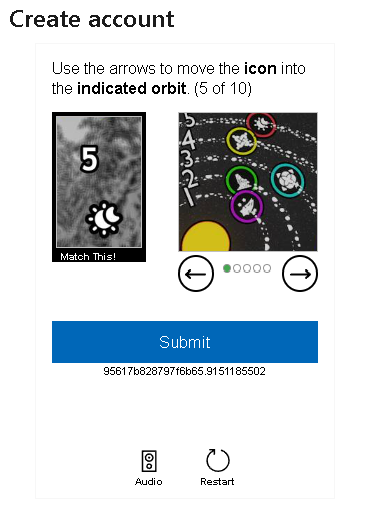
link to img = https://imgur.com/EKUANW9
Anyway, I had 2captcha service when i began this project, and of course 2captcha couldn't solve it.
I tried installing all the different captcha solving modules and sending the captcha (wasn't certain it was a funcapchta at the time, I couldn't find any examples of it anywhere online). Tried hCaptcha module, FunCaptcha module, Solve captcha with clicks module, I even found a module by cap.guru that said it could solve it, so I signed up for their service and setup the module and followed all the steps and it still didn't work.
I also signed up for anti-captcha (anti-gate), they couldn't solve it either. Then I tried Nopecha's free personal-use api (which is really awesome btw, you get like 100-150 free captcha a DAY. and its one of the fastest I've ever seen. and accurate. But sadly, you need to install the chrome browser AND get an api key, so its kind of redundant in that sense. BUUUUT.... that led me to my solution, and its the only solution I've seen anywhere online....TLDR:
Here's how I was able to get solve Microsoft's (Azure) FunCaptcha inside BAS:You have to sign-up for capsolver (get $1 free trial by joining their telegram)
You also have to download the capsolver free chrome extension. But not from the chrome store, you need to get it from their GitHub repository, here is the download link.
Then, after extracting the zip file file, go into the /assets folder and find the config.js file, open it in notepad or whatever text editor you use, and you will be able to add you API key (near the top).
then scroll down to where it says:
// Is captcha enabled by default or not
enabledForRecaptcha: true, <-- change to false
enabledForRecaptchaV3: true, <-- change to false
enabledForHCaptcha: true, <-- change to false
enabledForFunCaptcha: true, Leave this one true
enabledForImageToText: true, <-- change to false
enabledForAwsCaptcha: true, <-- change to falseand then save the config file back into the assets folder, replacing the old version.
then just follow the instructions for installing the extension found on the github repository. You'll need developer mode turned on and then click "Load unpacked" from the extensions manager page in chrome.
THEN after its installed, you need to get the extension ID from you extension manager page, just click on details under the name of the extension (CapSolver)
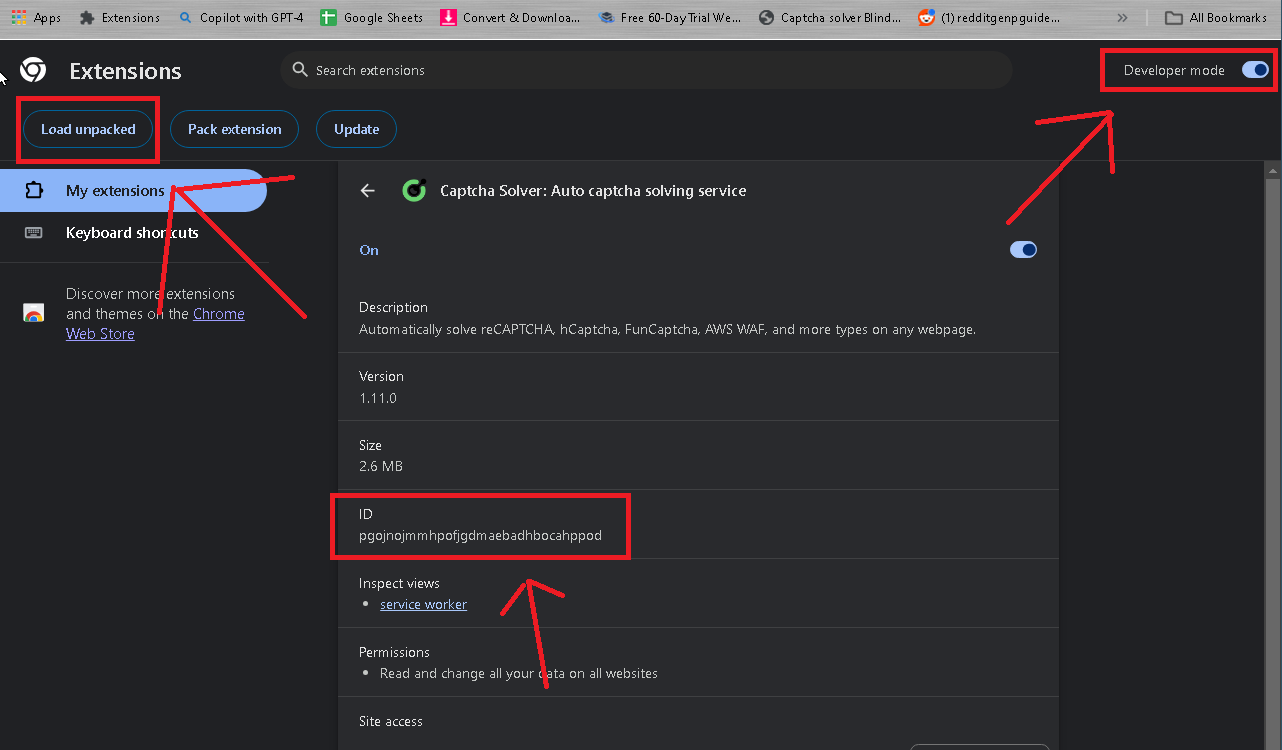
Then, using the extensionID, search your computer for the location in the chrome folder where the extension was installed too, here's what the path to mine looked like:
C:\Users********\AppData\Local\Google\Chrome\User Data\Profile 1\Extensions*pgojnojmmhpofjgdmaebadhbocahppod*\1.11.0_0now open BAS, load a script, then use the "browser settings" action and put the path to the installed extension into the "extensions" option. Running this action will restart your browser in BAS, so make sure you put it at the very start of your script. Then, you will be able to use the "click extensions button" and select the capsolver extension AND your api key and settings will be stored in the extension already, so you dont have to make any adjustments to the extension every time you run your script.
Also, you wont have to do a "solve captcha" action anymore like you normally would in BAS, the extension just automatically starts solving the captcha once it comes up. so just use "idle emulation" and set it for long enough for the extension to solve at least 10 puzzles.NOTE: the extension will often fail on the first attempt at solving the captcha, but just leave it and it will automatically attempt to solve it again, without any intervention from you... so just be patient and but don't stop the script just because it fails the first time. (I think adding a few seconds delay to the extension to wait before starting the puzzle would solve the whole failing on the first attempt problem. I watched it closely, and it always answers the first puzzle WAY faster than any of the other 9 puzzles, and it always gets the first one wrong...)
Anyway, I know that was a long fuckin story, but I've seen a lot of people asking how to solve this FunCaptcha lately here on the forums, and I know much time I spent searching for any kind of help solving this damn 10 puzzle captcha lol
if you need help, message me here or telegram @kat_liv3
Thanks, and enjoy!
-
My current system allows me to count the number of captcha done 1 / 2 / 3 / 4 / 5 Have you managed to intercept the callback via javascript? Because if a second challenge comes up I solve it with a loop that waits but I have trouble detecting a second challenge.
-
By analyzing the allow mask cache you'll find all the requests for fun captcha/arkose labs the masks are fc/ca fc/gfct you can retrieve the waves, count the number of challenges and define limits I managed to do this after a few hours on it.
And it works like a charm if 10 or 20 waves hop we change or if it makes more than 2 challenge we change threads. -
This post is deleted!
-
my telegram is actually @katalys1 now