Your browser does not seem to support JavaScript. As a result, your viewing experience will be diminished, and you have been placed in read-only mode.
Please download a browser that supports JavaScript, or enable it if it's disabled (i.e. NoScript).
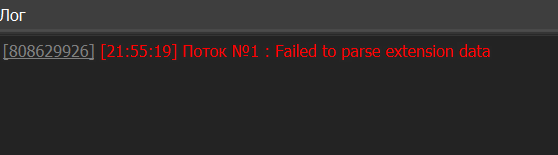
When installing the MetaMask extension, an error occurs - Failed to parse extension data please help me
Hi can you send us what you put in the settings browser extension it should look like this ? nkbihfbeogaeaoehlefnkodbefgpgknn
thank you it works now
@filiplamwin Just look at this thread : Adding extension
@JacksonSteel said in Can't add chrome extension in Browser Automation Studio?:
I wanna add this. https://chrome.google.com/webstore/detail/pop-up-blocker-for-chrome/bkkbcggnhapdmkeljlodobbkopceiche It clicked a link, but nothing comes out, I guess BAS can’t support popped up tab.
BAS does not yet support browser extensions
@yourfriendkarol said in Extension not working?:
the path i have in bas: C:/Users/jjjjjjj/Desktop/EXTENSION extension is folder file manifest exists at: C:/Users/jjjjjjj/Desktop/EXTENSION/manifest.json what could be wrong?
the path i have in bas: C:/Users/jjjjjjj/Desktop/EXTENSION
extension is folder file manifest exists at: C:/Users/jjjjjjj/Desktop/EXTENSION/manifest.json
what could be wrong?
This has already been said, very few browser extensions work.