
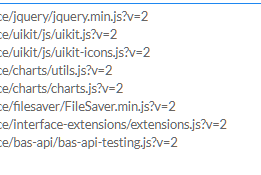

@juli I can’t say for sure, as it depends heavily on the website you are working with
About Multilanguage
-
I have a question.
I want to show my software both in English and in a different language.
How to change the language in the web interface?
For example, the equivalent of words such as about, restore defaults has been entered in Russian by the system and I do not know where it can be changed.
Placeholders etc are also written in Russian.
again on radiobuttons etc. Radiobutton names can be changed, but I don't know how to change the options.
Is there an example video or guide?
-
I solved the problem. Let me write down my solution so that someone else who encounters a similar issue might come across it.
If you cannot change the Russian characters defined by the system, add a space to the end of the English versions' names.
For example, when the word 'About' is in the form 'About', changing it to 'About ' will now be seen as a new value. By doing this, you're essentially modifying the original 'About' text, thus you can make your own adjustments since there is no Russian equivalent in the system.
Similarly, the words within the placeholder were also found with their Russian equivalents and couldn't be changed with InitTranslations().
Here, add a space to the end of the English value within the placeholder in the HTML page.
In the InitTranslations() part, translate the version with the added space to the desired language.
Also thanks to @Fox for giving information about the use of "tr" in this topic. http://community.bablosoft.com/post/136557
note. Translated with chatgpt, please ignore any misspellings.
-
@fr0121 said in About Multilanguage:
For example, when the word 'About' is in the form 'About', changing it to 'About ' will now be seen as a new value. By doing this, you're essentially modifying the original 'About' text, thus you can make your own adjustments since there is no Russian equivalent in the system.
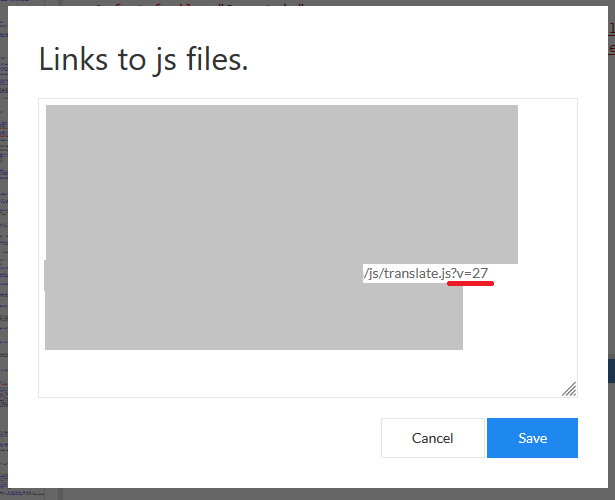
The web interface is just an html page, when you load a page in the browser, it caches files so as not to download them again. The web interface does the same thing, to avoid this, you can add a question mark and, for example, a version to the link to the attached file. Due to this, the browser will think that this is a new file, since the link has been changed
-
@Fox said in About Multilanguage:
The web interface does the same thing, to avoid this, you can add a question mark and, for example, a version to the link to the attached file. Due to this, the browser will think that this is a new file, since the link has been changed
I didn't know that. I will try it, thank you!
-
-
@fr0121 said in About Multilanguage:
@Fox hello Fox There does not appear to be a file named translate.js.
Could it be extensions.js?
What does this have to do with the "translate.js" file? Read carefully what I wrote again.
-
@Fox In the image you shared, all extensions are hidden, only the translate.js extension is shared.
I thought you meant that the version of this file needed to be changed, and I couldn't change it because I couldn't find it.
Instead, I increased the versions of all existing files from 2 to 3 and saved them that way.
But then after making changes to the interface I got Russian translations again, no solution.
Is there something I missed?
-
@fr0121 said in About Multilanguage:
@Fox In the image you shared, all extensions are hidden, only the translate.js extension is shared.
I thought you meant that the version of this file needed to be changed, and I couldn't change it because I couldn't find it.
Instead, I increased the versions of all existing files from 2 to 3 and saved them that way.
But then after making changes to the interface I got Russian translations again, no solution.
Is there something I missed?
In addition to the image I also attached the text to the post, did you read it?
-
@Fox What I understood from the translation was this.
Change the version number at the end of the translate.js extension file that I mentioned in the image. Now your updated version will be registered and the system will work on this version.
because by default, cached data is pulled. To update, change the version.
Did I understand wrong?
-
@fr0121 said in About Multilanguage:
@Fox What I understood from the translation was this.
Change the version number at the end of the translate.js extension file that I mentioned in the image. Now your updated version will be registered and the system will work on this version.
because by default, cached data is pulled. To update, change the version.
Did I understand wrong?
Yes, you got it wrong. I'll try to explain it again, look, you use a web interface in your project, for convenience you attach the code with a file, but when you change the code in the attached file, the web interface doesn't see these changes. This is because the browser that displays the web interface downloaded the file earlier and cached it. To force the browser to refresh the file and thus update the data, you need to change the link to the file, e.g. change the version with "?v1" after the question mark.
