Your browser does not seem to support JavaScript. As a result, your viewing experience will be diminished, and you have been placed in read-only mode.
Please download a browser that supports JavaScript, or enable it if it's disabled (i.e. NoScript).
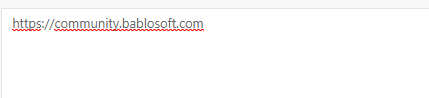
I would like to know how i could remove the red line under the text in custom interface. The input in the interface field is not "en" or "ru". I have tried disabeling in windows by setting Spelling to Off without success. Any help is appreciated.
https://www.w3schools.com/howto/howto_html_spellcheck_disable.asp
@pirkhezr you can try use cycle, where you checking selectors by [[IS_EXIST]]
@fr0121 said in Can administrators access our scripts?:
Are the scripts we license encrypted or can administrators gain access?
Bablosoft does not store the source files of scripts on its servers, all scripts are uploaded to your personal account in encrypted form
Thanks to @Fox and here the complete version 1582309913878-332.xml if anyone needs it in future
Thanks for the Reply. Silly me, I found a way by using the click drag function then search for it on screen via coordinates etc.