

@Sytehel Oh, I love BAS :)
[Bug] "Generate code with AI" displays a blank white screen (v29.5.0)
-
1. Description of the issue:
Since yesterday evening, the "Generate code with AI" feature has stopped working. When I click to open it, the window appears but remains completely blank/white. No interface loads.2. Steps to reproduce:
- Open Browser Automation Studio.
- Click on the "Generate code with AI" button/feature.
- The popup window opens but stays white/blank indefinitely.
3. Troubleshooting steps already taken:
To rule out local environment issues, I have tried the following, but the issue persists:
• Reinstalled BAS: I performed a clean installation of the latest version.
• Different Hardware: I tested this on a completely different computer.
• Different Network: I switched to a different internet connection/ISP.4. Technical Details:
• OS: Windows 11
• BAS Version: 29.5.0
• Logs: No error logs were generated in the main log window (just a blank screen).Conclusion:
Since this is happening on multiple machines and networks, it strongly suggests a server-side issue. Please investigate.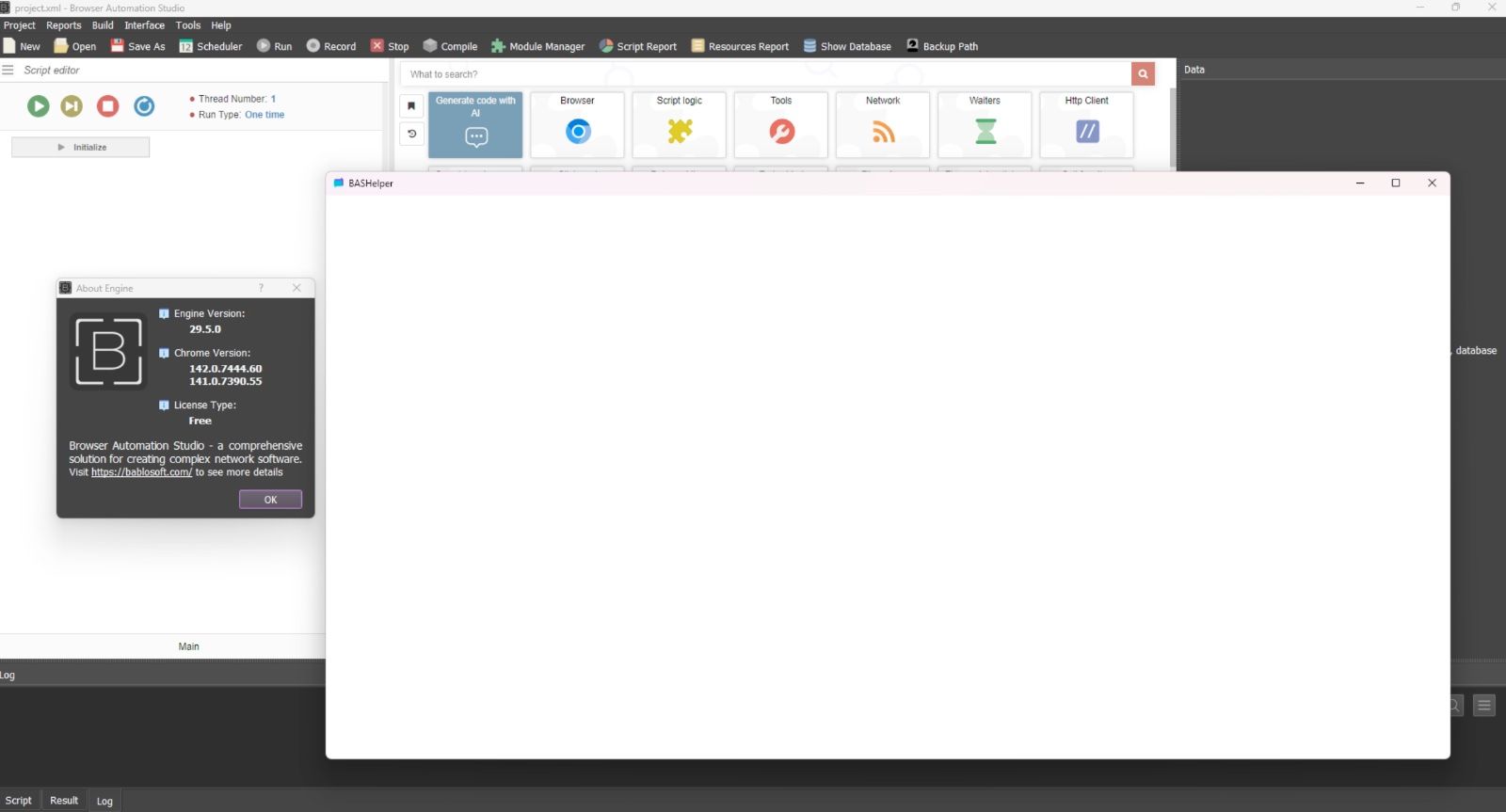
-
Thank you!
The problem has been reported to the developer.
