I tried applying this using ChatGPT, but it didn't work for me. Can you tell me where to put this code to make my code work?
// Функция для эмуляции нажатия мыши внутри элемента <canvas data-sentry-element="Stage"> function simulateMouseClickInCanvas() { const canvas = document.querySelector('canvas[data-sentry-element="Stage"]'); if (!canvas) { console.error("Элемент <canvas> не найден."); return; } const rect = canvas.getBoundingClientRect(); // Выбираем случайные координаты внутри элемента <canvas> const randomX = Math.random() * rect.width + rect.left; const randomY = Math.random() * rect.height + rect.top; // Создаём события мыши const mouseDownEvent = new MouseEvent("mousedown", { bubbles: true, cancelable: true, clientX: randomX, clientY: randomY, }); const mouseUpEvent = new MouseEvent("mouseup", { bubbles: true, cancelable: true, clientX: randomX, clientY: randomY, }); const clickEvent = new MouseEvent("click", { bubbles: true, cancelable: true, clientX: randomX, clientY: randomY, }); // Эмулируем события canvas.dispatchEvent(mouseDownEvent); canvas.dispatchEvent(mouseUpEvent); canvas.dispatchEvent(clickEvent); } // Функция для выполнения кликов с рандомной задержкой function performRandomClicksInCanvas(maxClicks) { let clicksCount = 0; function clickWithRandomDelay() { if (clicksCount >= maxClicks) { console.log("Все клики выполнены"); return; } const delay = Math.random() * (2000 - 100) + 100; // Рандомная задержка от 0.1 до 2 секунд setTimeout(() => { simulateMouseClickInCanvas(); clicksCount++; console.log(`Клик ${clicksCount} выполнен (задержка: ${Math.round(delay)} мс)`); clickWithRandomDelay(); // Рекурсивный вызов для следующего клика }, delay); } clickWithRandomDelay(); } // Запуск выполнения 10 кликов performRandomClicksInCanvas(10);wait while element exists (also visible)
-
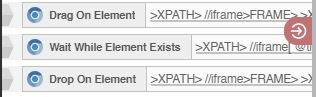
I want to solve a PxCaptcha manually using drag and drop actions. My function starts with
- dragging on the Press button (It's a <p> tag inside a <div> actually)
- then it uses "wait while element exists (also visible on screen). I want to wait until the text, "Press and hold", is visible on the screen. You know once the bar is complete it turns into checkmark and dots then.
- Finally when the "Press and Hold" is not visible anymore, it drops on the same element to stop the dragging.
My problem:
When I test it manually, it works completely fine. the "Also visible on screen" actually works and even if an element is present in the page source the "Is element exists" function returns false.
However, when I use "Is element exists" in a loop or when I use "wait while element exists", I keep getting the same results (false or true) whether the element is visible or not.I tried to reverse this logic and use the dot element. The same problem.
Is there any problems with my logic? Or I am using the BAS functions wrong? Or this is just a BAS problem?
Notable: The element is inside two iframes.