

Только что обратил внимание на профили в HTTP cool, а конструктор из логики убрали...
The new AI Captcha Module in BAS: full breakdown, setup, and real tests
-
If you want, you can just watch the video on YouTube. I tried to fit both a tutorial and a lot of testing into one video, and I also used diagrams to make everything easier to understand
I also created a telegram channel where I’ll share my thoughts and interesting stuff. For now, I’ve posted the mind maps from the video and some articles there: https://t.me/mustangbasen
This article is basically a shorter text version. First we will look at how the module works and what is in the settings, then I will show what happened in real tests with different captchas and compare the models by results, requests, tokens and cost
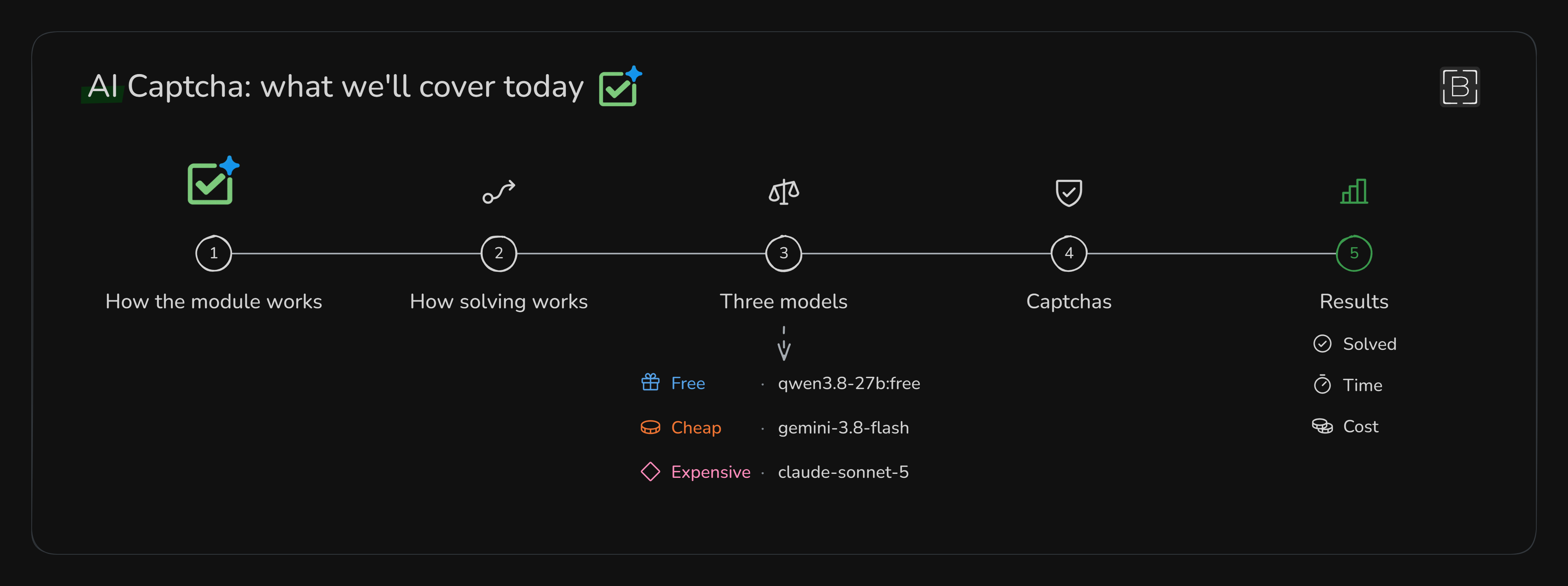
Captchas I tested with real examples
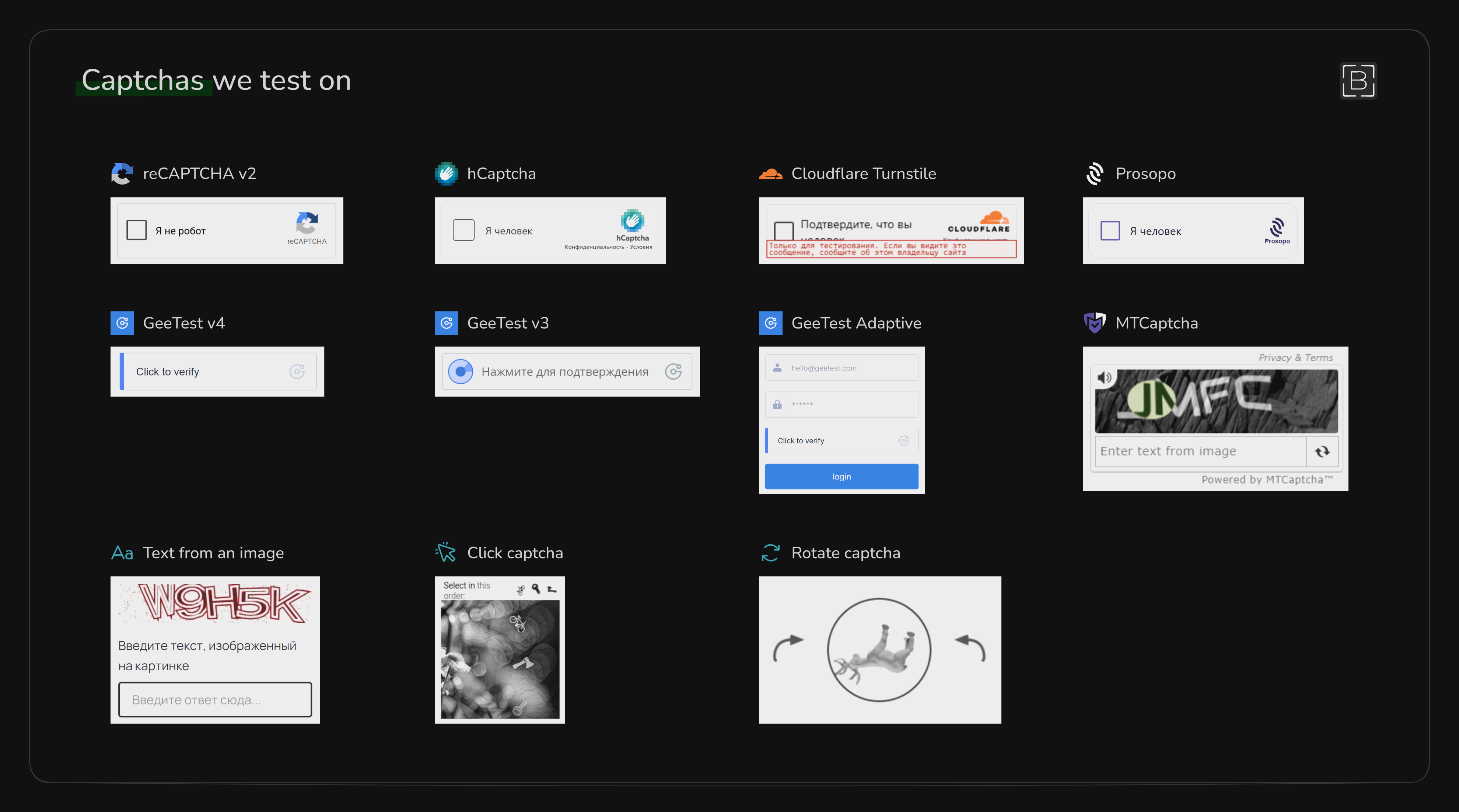
I did not just look at the settings and assume the module worked. I actually ran it on different captchas and checked what it could solve. These were included in the tests:
- reCAPTCHA v2 26:22
- hCaptcha 33:50
- GeeTest v4 44:51
- Cloudflare Turnstile 50:49
- GeeTest Adaptive 52:29
- GeeTest v3 56:57
- Basic text from an image 1:03:55
- Click captcha 1:05:16
- Rotate captcha 1:08:31
- MTCaptcha 1:12:13
I also wanted to test Prosopo, but I could not test it properly because the test page was unavailable
What AI Captcha actually does

Put simply, AI Captcha solves a visible captcha inside the built-in BAS browser. It takes a screenshot, sends it to the models, gets commands back and then clicks, drags something or types text into a field
The model does not control the mouse by itself. It just looks at the image and tells BAS where to click, what to drag and where to type. BAS then does the actual work in the browser
I tested all of this in the new BrowserAutomationStudio 30.9.0 release
Why there are two models
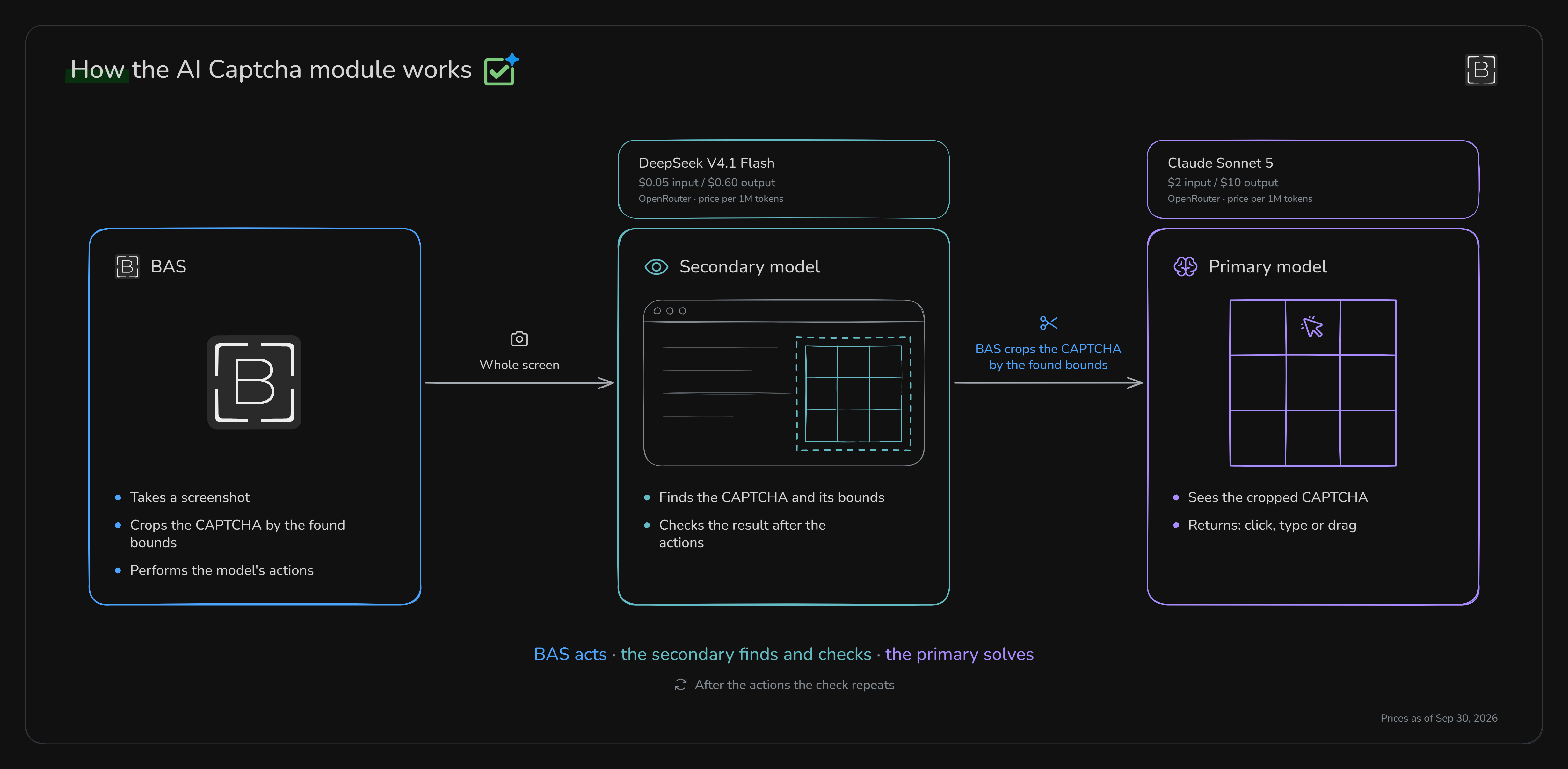
At this point you might be wondering why the module needs two models at all. It looks like BAS could just send the screenshot to one model and let it handle everything. Basically, the work is split so an expensive model is not used for every small check
-
The secondary model sees the whole BAS browser screen. It finds the captcha, works out its boundaries, can click a basic checkbox and then checks whether the captcha is solved. You can use something cheaper here because the job is usually pretty simple
-
The main model receives the cropped captcha itself. This is the model that needs to understand what is on the image, what it is supposed to do and how to solve it. So this is where it makes sense to use a stronger model
-
And BAS is basically the executor here. It takes screenshots, crops the captcha, checks the model response, maps the coordinates back to the page and moves the mouse
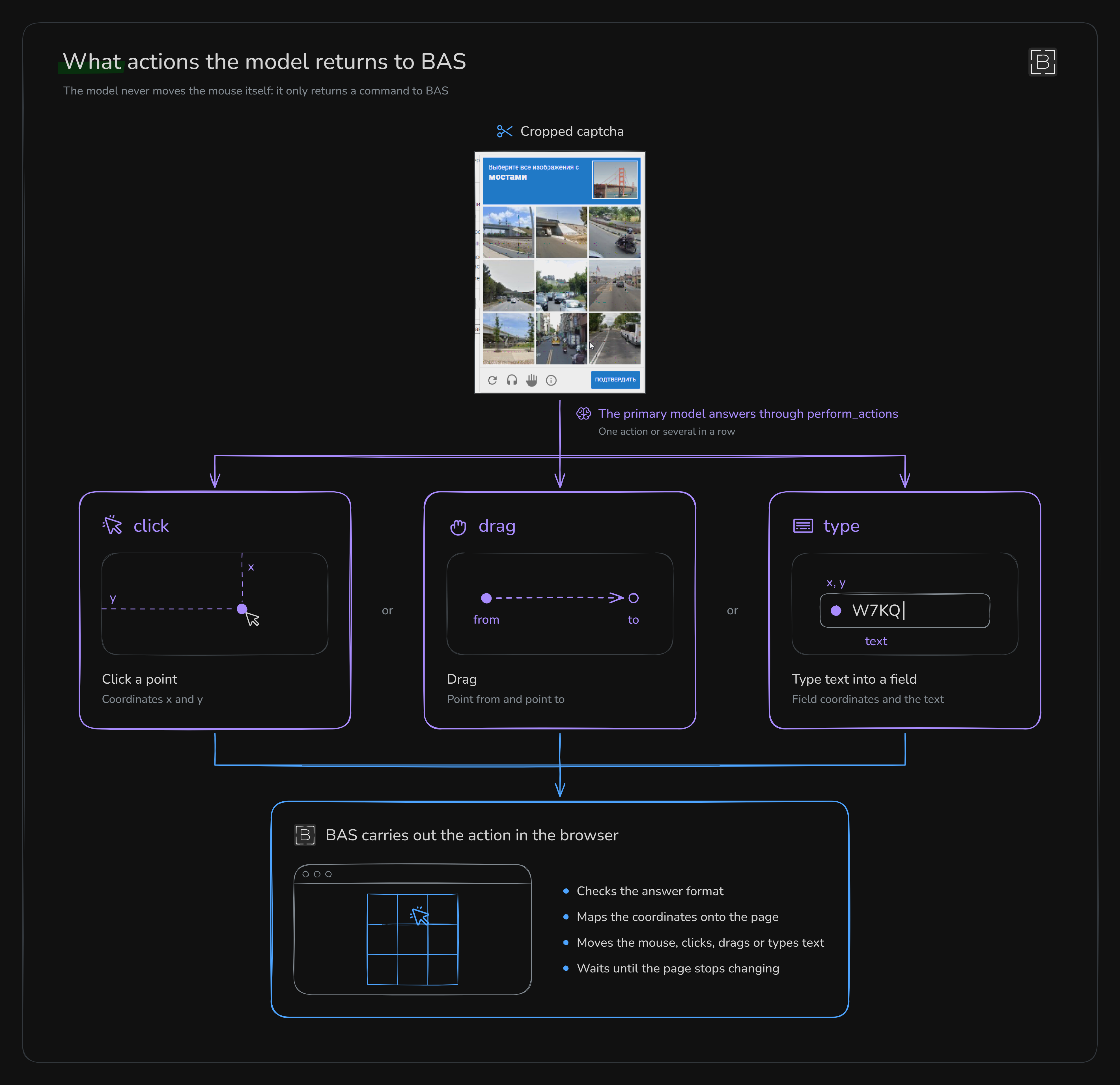
The main model can return three types of actions:
-
clickclicks a point using thexandycoordinates -
dragmoves something from thefrompoint to thetopoint -
typeclicks a field and enters text
It can also return several actions in one response. For example, it can select several images and then press the confirmation button. So BAS does not need a separate request for every single click
What I entered in the BAS action
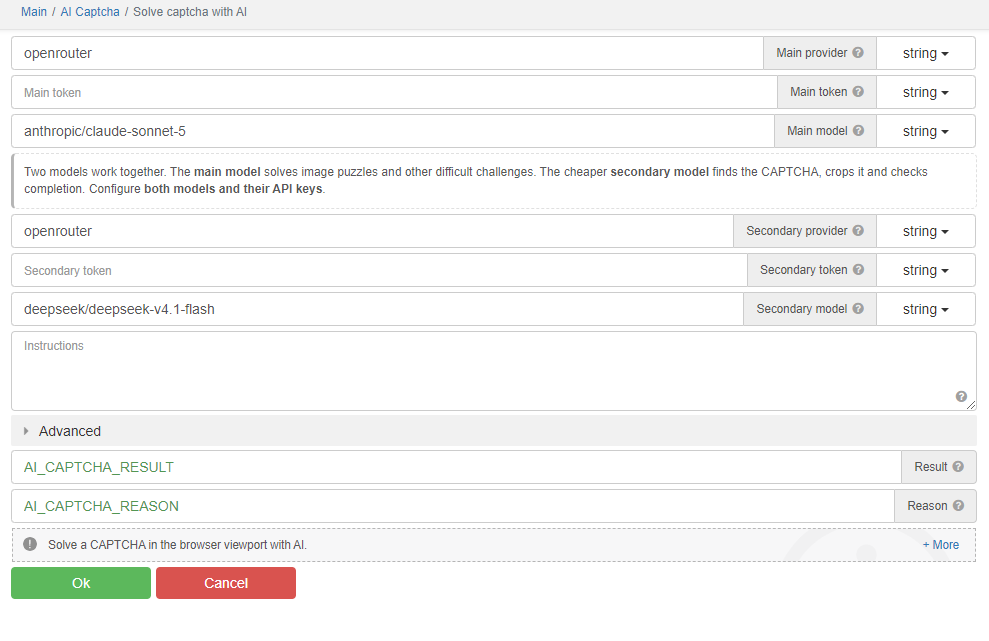
I used OpenRouter for these tests. The convenient part is that you can switch between different models through one provider. You just need to create an account there and copy your key, and I showed how to do all of that in the video
In the video I go through OpenRouter in detail, starting with account registration: watch from 16:34
Let's start with the main settings in the captcha-solving action:
-
Main provideris the provider -
Main tokenis the key for the main model -
Main modelis the main model that will solve the captcha -
Secondary provider,Secondary tokenandSecondary modelare the same settings for the secondary model that finds the captcha and then checks the result -
Instructionsis where you can tell the model what kind of captcha you are solving and how it should solve it
I underestimated
Instructionsat first. A model can usually work out a simple captcha by itself. But when it needs to click objects in order, solve a puzzle captcha or understand some unclear mechanic, it starts messing up, wasting requests or saying it is done while the captcha is still sitting there. So, basically, try to write the instructions for the specific captcha you are solving right awayHow to add a model from OpenRouter
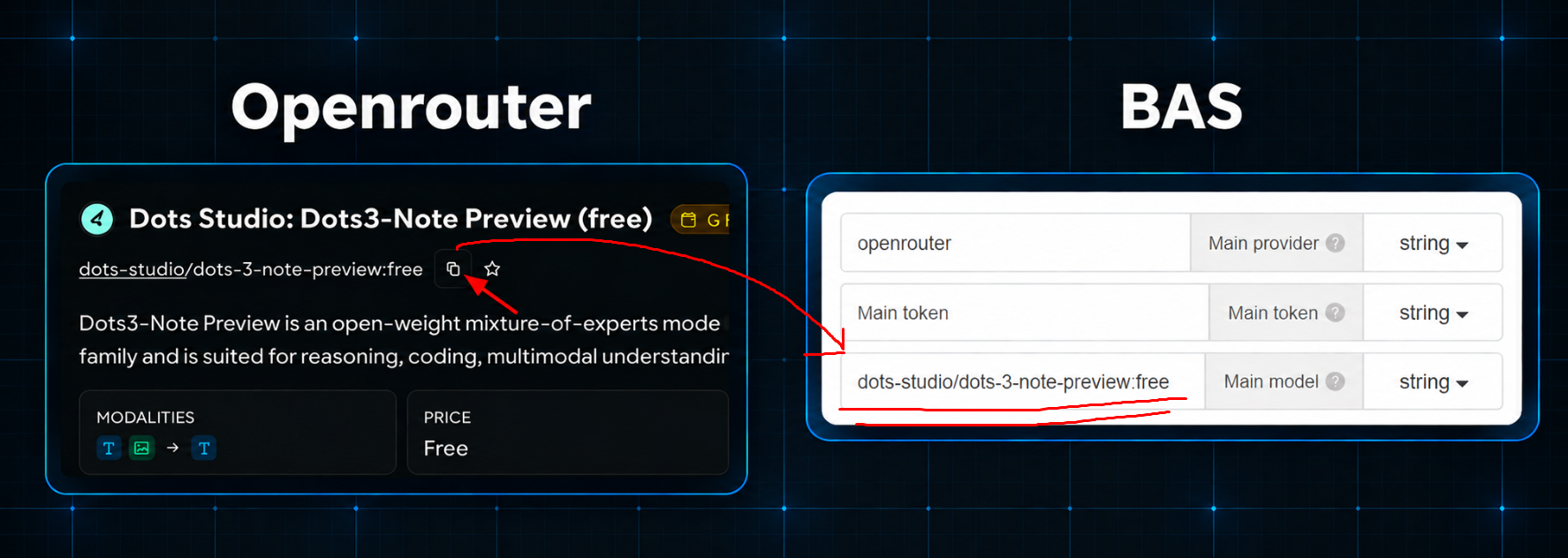
If the model you need is missing from the ready-made list and you are using OpenRouter, open its page, copy the exact
Model IDand paste the full value into the model field, just like I showed in the screenshotI chose three main models for this project:
-
qwen/qwen3.8-27b:freeas the free one -
google/gemini-3.8-flashas the cheap one -
anthropic/claude-sonnet-5as the expensive one
Models and prices change all the time. There was no special logic behind this selection, I just wanted to test what each model could do and how the module worked overall
Advanced settings
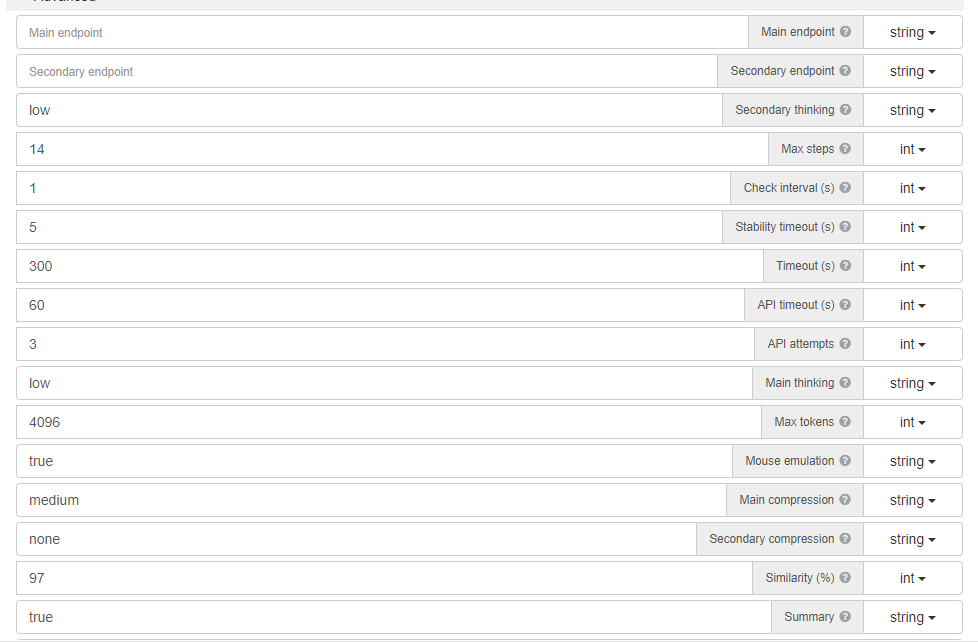
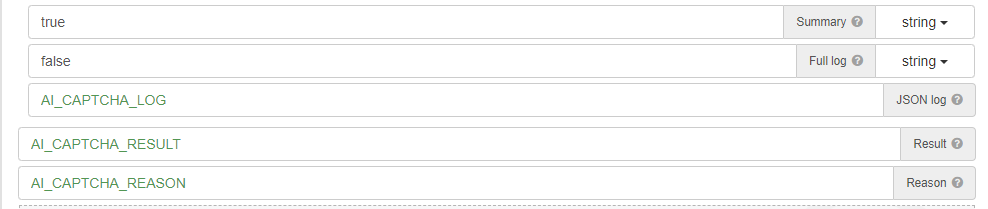
There are a lot of settings in the Advanced tab, so here is what each one does:
-
Main thinkingandSecondary thinkingcontrol how hard the models think about the task. Start withlow. If the model completely fails, tryhigh, because that really helped on many tasks -
Max stepsis 14 by default. If the main model sends 14 responses and still gets nowhere, the action ends with an error. For some rotate captchas it is better to allow more steps -
Check intervalandStability timeoutmake BAS wait after a click or drag instead of taking another screenshot while the page is still changing -
Timeoutlimits the whole action by time. The default is 300 seconds (5 minutes) -
API timeoutgives one model request up to 60 seconds. If you use free models, set it to 120 or even 180 seconds right away -
API attemptsis 3 by default. That means one normal request and up to two more attempts if the provider temporarily fails -
Main compressionandSecondary compressionresize the images. More compression means fewer image tokens, but the model may simply stop seeing small text and details, so this needs testing -
Similarityhelps BAS decide whether the page has stopped changing. The default is 97 percent -
SummaryandFull logare just for debugging.Summaryshows a short action history, whileFull logsaves the complete log with screenshots and page data -
Resultis saved toAI_CAPTCHA_RESULT. It shows the number of steps and requests, token usage and runtime -
Reasonis saved separately toAI_CAPTCHA_REASON. It contains the short completion reason, for examplemodel_doneorno_captcha.model_donestill does not mean the site actually accepted the captcha, so it is better to check the page separately after the action
How the whole thing works step by step
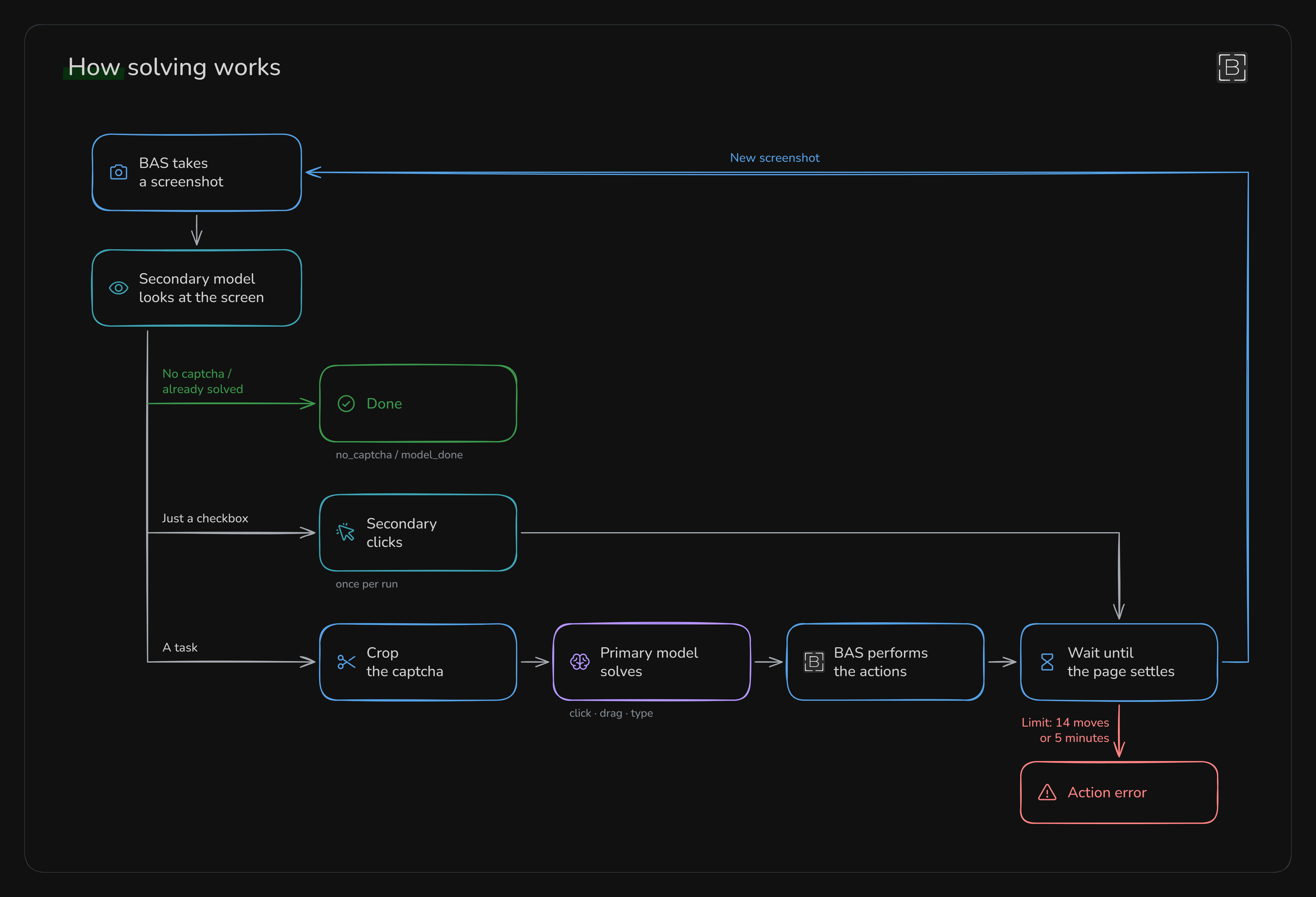
Basically, it works like this:
-
BAS takes a browser screenshot
-
The secondary model checks whether a captcha is there and where it is
-
If it is just a checkbox, the secondary model can click it itself
-
If a challenge appears, BAS crops it and sends it to the main model
-
The main model returns clicks, drags or text
-
BAS performs the actions and waits until the page stops changing
-
BAS takes another screenshot and checks everything again
This keeps going in a loop. It stops when the captcha disappears, the model thinks it is solved, the overall timeout runs out or the main model uses all 14 responses
What kinds of captcha the module can solve
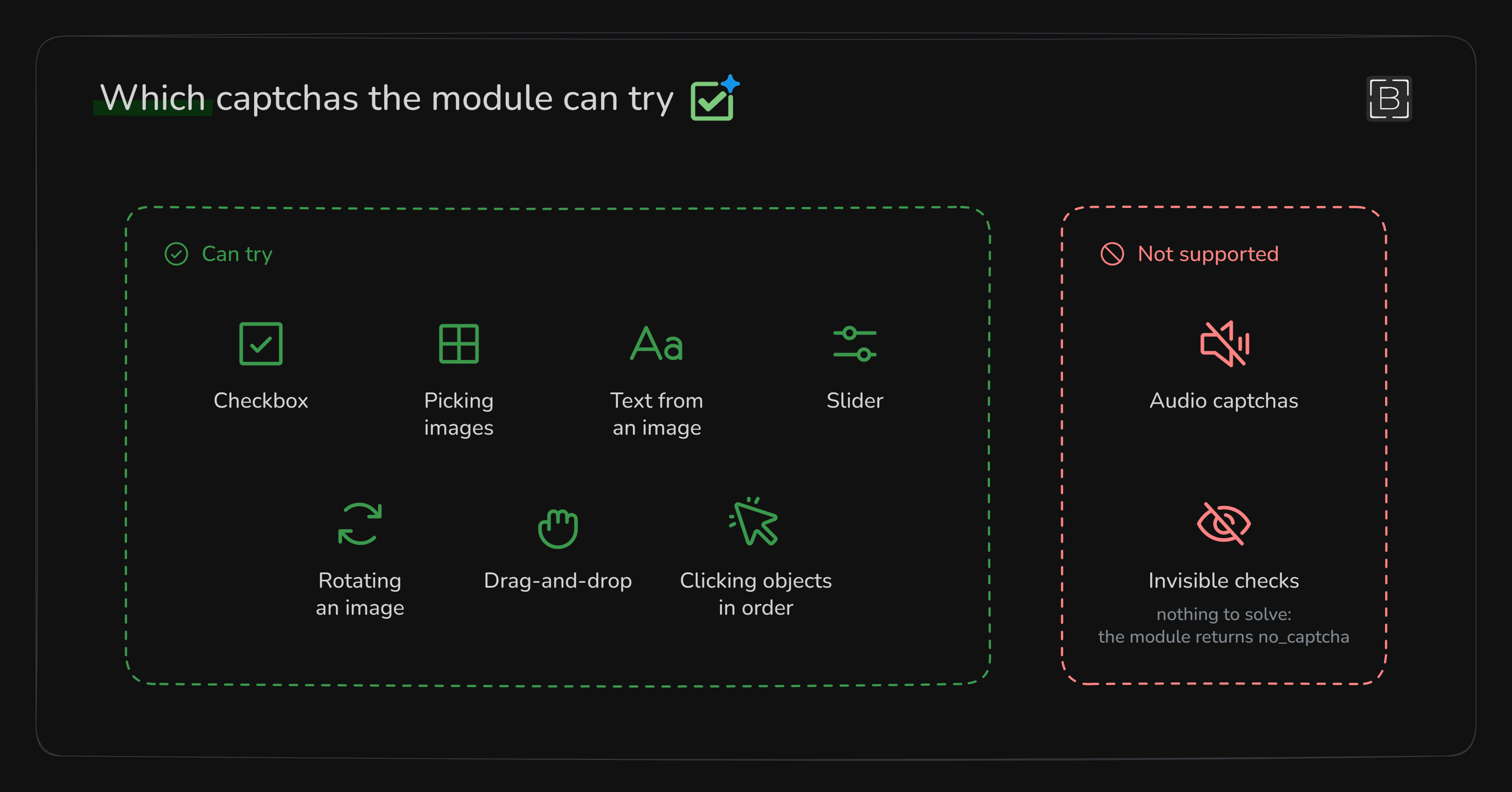
If a captcha can be solved from an image with clicks, dragging or text input, the module can at least try. That includes checkboxes, image selection, text from an image, sliders, image rotation, drag-and-drop and clicking objects in a particular order
It obviously does not solve audio captchas or invisible captchas like recaptcha_v3
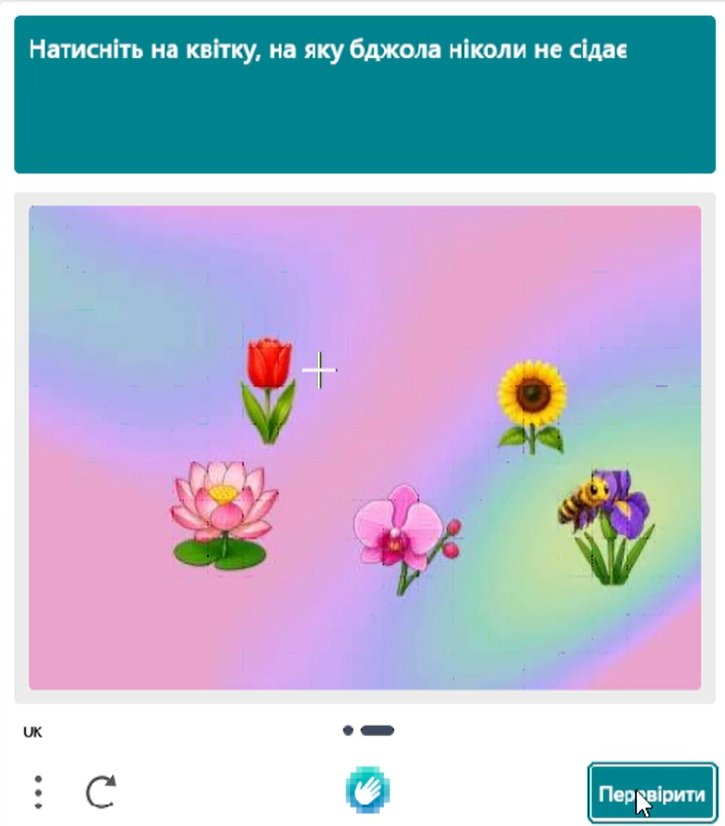
I had some partial success with dynamic hCaptcha, but it never worked consistently. One challenge had a wasp flying between several flowers, and then you had to pick the flower it had never landed on
That was where the model started messing up, because it receives separate images instead of a video. It simply could not properly track which flowers the wasp had landed on. Basically, maybe you could get it working by spending a lot of time on good instructions and testing different models, but challenges like this probably will not work right away, if they can even be solved with this module at all
What happened with the models
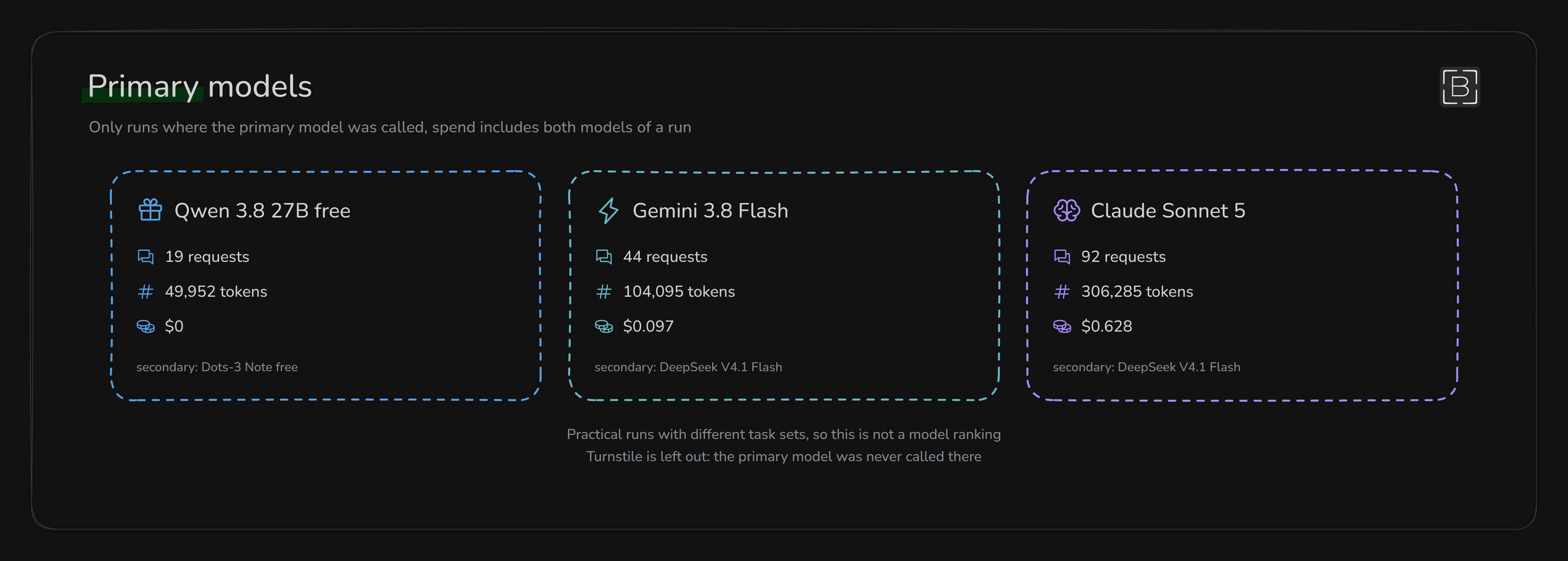
Looking only at the saved runs where the main model was actually called, I got this:
-
Qwen 3.8 27B free made 19 requests, used 49,952 tokens and cost $0
-
Gemini 3.8 Flash made 44 requests, used 104,095 tokens and cost $0.097
-
Claude Sonnet 5 made 92 requests, used 306,285 tokens and cost $0.628
These costs include both the main and secondary models used in each run. I left Turnstile out because the main model was not called there at all
And this is where things got interesting. Claude Sonnet 5 understood the image quickly and usually understood what it was supposed to do. But sometimes its coordinates were just awful. The much cheaper Gemini 3.8 Flash ended up working better on my GeeTest puzzles
So yeah, choosing the most expensive model and expecting it to solve everything is not going to work. You need to take the actual captcha and see which model behaves normally on that particular task
What happened with each captcha
-
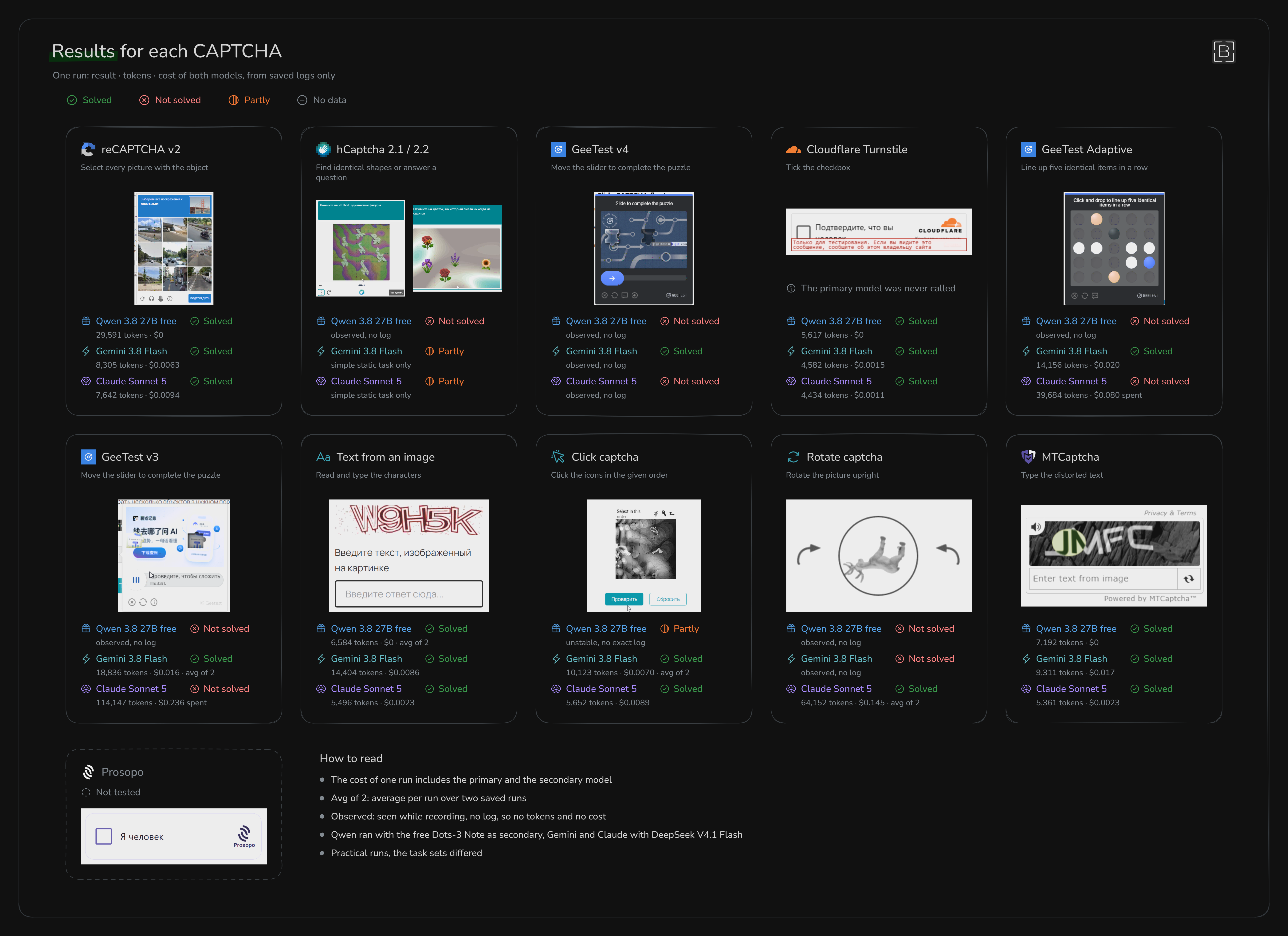
reCAPTCHA v2: there was not much to say here, just a normal image selection challenge. All three models solved it
-
hCaptcha: Gemini and Claude sometimes handled the static tasks, so they have a partial result. As soon as adaptive captchas appeared, everything started falling apart and the results were weak. There are a lot of different hCaptcha tasks, so I think the module can solve many of them, but the one with the wasp seems impossible to me)))
-
GeeTest v4 and GeeTest v3: the free Qwen model completely failed. Claude seemed to understand the puzzle, but then returned terrible coordinates and moved the slider to the wrong place. Gemini solved the puzzle, and I ran GeeTest v4 again later and it solved it again
-
Cloudflare Turnstile: this one was really simple. The secondary model clicked the checkbox and checked the result. The main model was not even needed
-
GeeTest Adaptive: Gemini solved it. Claude selected the correct objects but clicked slightly outside the right spots, so the whole thing failed. The free model first missed the captcha completely and then hit a free pool rate limit
-
Text from an image and MTCaptcha: all three models solved them. There is not much to break down here, the model recognized the characters, entered them into the field and that was it
-
Click captcha: Qwen would start correctly and then mess up later, so it only got a partial result. Gemini and Claude solved it in the saved runs
-
Rotate captcha: it basically ate more money than anything else. The free model got confused, Gemini hit the timeout and Claude finally solved it. Even Claude needed a ton of repeated checks, and the two saved runs averaged about $0.145 each
There were 10 captcha types, 161 model requests and 474,965 tokens. The saved runs cost about ~$0.727. These are not super accurate numbers, just a rough estimate. Overall I spent $3 on the whole project, which included 80-100 different captchas across three models, because a lot happened off camera and I also had to reshoot parts
What I learned from all of this
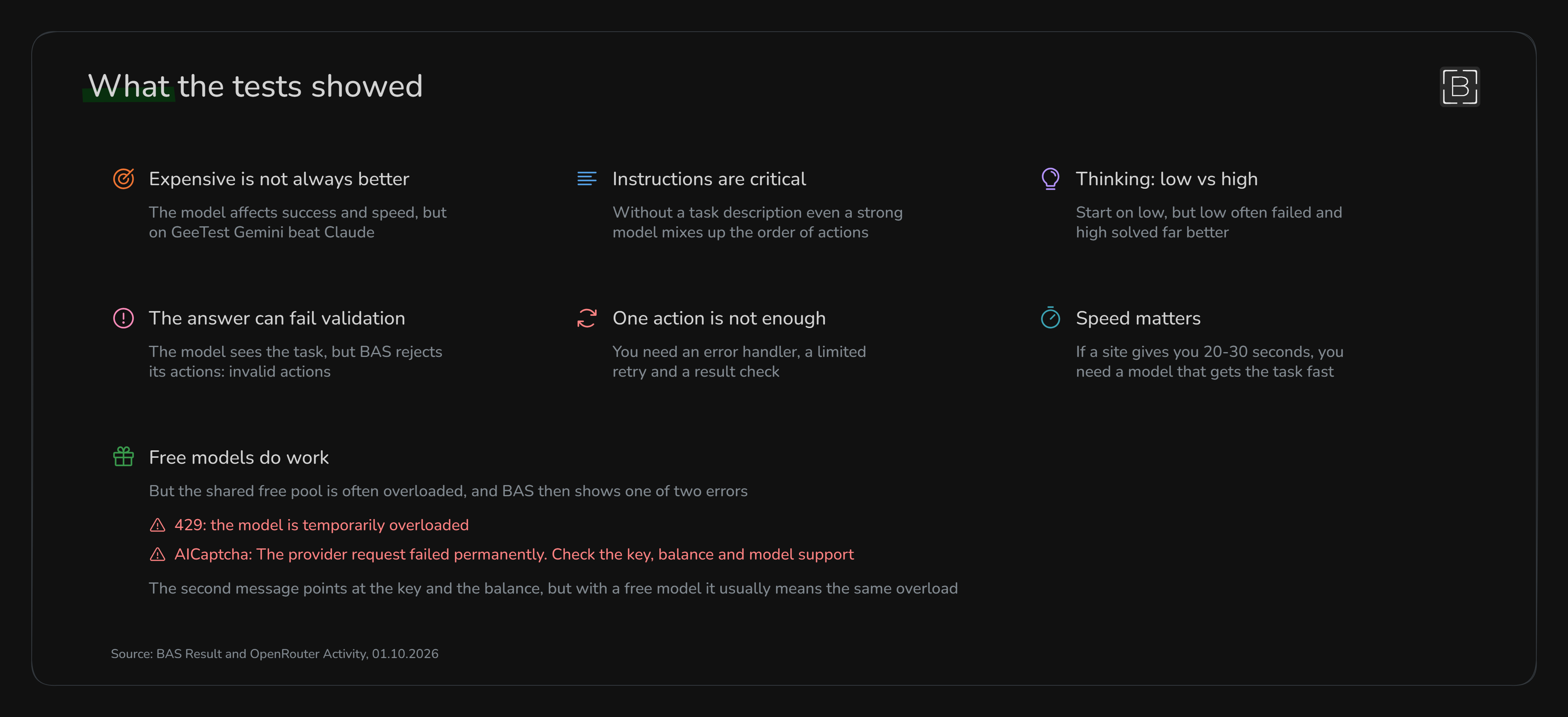
The most expensive model is not automatically the best one. Claude understood the tasks faster, but its coordinates were awful and that broke the whole solve. Gemini was cheaper and simply worked better on several puzzles
Good instructions make a real difference too. If you throw some weird captcha at a model without explaining anything, it may sit there thinking, mix up the order and burn through requests. I would explain what needs to be selected, where it needs to be dragged and when the model should press confirm, literally explain everything like you would to a small child
With thinking, I would keep it simple. Start with
lowand see whether the model can handle the captcha. If it keeps messing up, tryhigh. There is not much point in usinghigheverywhere from the start because it can mean more time and more tokensAnd one AI Captcha action probably will not be enough in a real project. I saw provider errors,
invalid actions, bad coordinates and models deciding they were done too early. So you need an error handler, a limited number of retries and a normal page check after the captchaFree models can work too, but you should expect some hassle. They solved simple text captchas, reCAPTCHA and Turnstile in my tests. The shared OpenRouter free pool was sometimes overloaded though, so I got a 429 error and a simple captcha could take several minutes. It is fine if you just want to try the module, but for regular work I would look for something more stable
So what is the result
Overall, I liked the module. It is not tied to one traditional captcha-solving service, and you can try different models to see which one works better for a particular captcha
You need to understand that this is not one button where you click once and it solves everything by itself. You really have to sit down and test it: try different models, change the instructions, switch between
lowandhighthinking, see where things break and run it again. Most of the result comes down to testing, because one model may solve one captcha normally and completely fail on anotherEverything about the action itself and its settings was checked in BrowserAutomationStudio 30.9.0. The models, prices and free-pool conditions were current when I ran the tests