

@naeem For a sensible answer, I need to know more information. Which JSON file is it and what is it for?
JSON file is easy to create, just click "Write to file", for example, with the name "my_file.json". You can find the content (syntax) of JSON here: https://developer.mozilla.org/en-US/docs/Learn/JavaScript/Objects/JSON
In the task scheduler, two of the tasks can run automatically, and the other two will always show Downloading.
-
In the task scheduler, two of the tasks can run automatically, and the other two will always show Downloading.
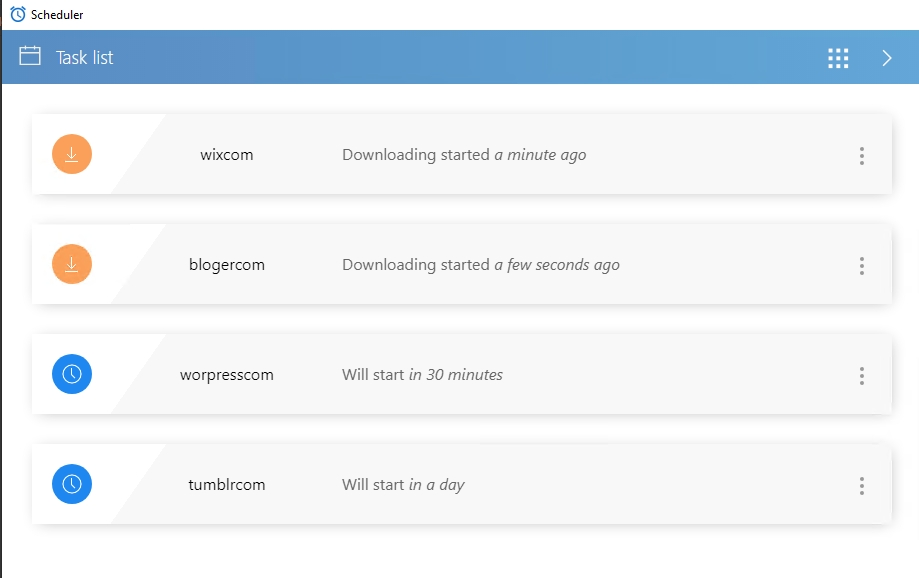
I have tried deleting the task and re-uploading the script, but it still says "downloading"
The script works normally in record mode
MY BrowserAutomationStudio version 28.9.3 (premium).
Please help me, thanks
-
@m4zuper
Thanks for your replyI found the problem. Because there is not enough free space on the C drive.
I downloaded TaskScheduler and installed it to D:\TaskScheduler.
Do I need to uninstall the program in the original folder C:\Users\AdministratorAppData\Local\TaskScheduler\1.6.0?Should I start D:\TaskScheduler directly or start TaskScheduler through the main program of BAS?
-
@ybwh003 said in In the task scheduler, two of the tasks can run automatically, and the other two will always show Downloading.:
Do I need to uninstall the program in the original folder
This is not necessary
@ybwh003 said in In the task scheduler, two of the tasks can run automatically, and the other two will always show Downloading.:
Should I start D:\TaskScheduler directly or start TaskScheduler through the main program of BAS?
If you want to run a separately downloaded scheduler, you need to run it from its own directory