

@givirus its because of your script logic, maybe you dont call the function? OR you dont have proper error handling which results into certain parts of your script being skipped since they are inside an if statement. I encountered this problem many times in the past, you will need to handle errors and it'll will be most likely fixed, for the purpose of debugging you can use the "Log" function at several points to see where it will print it.
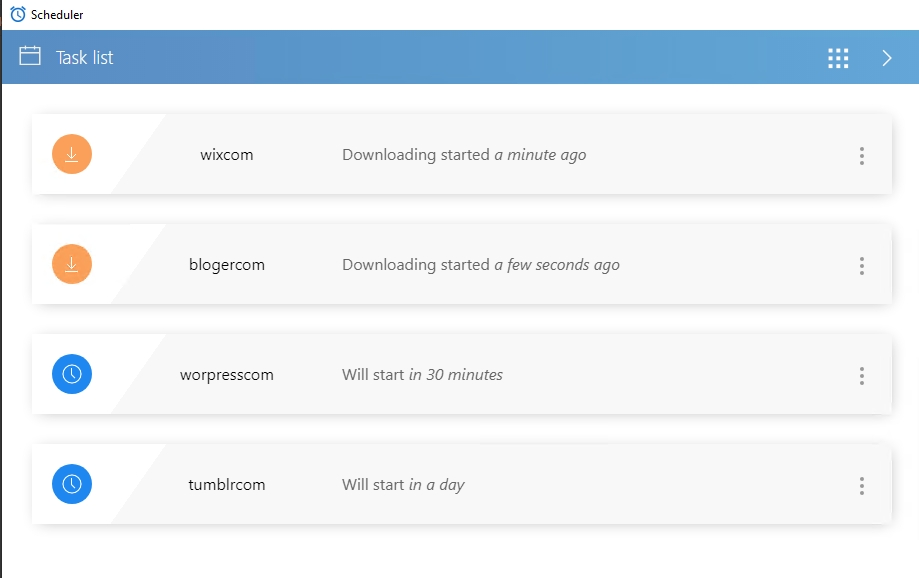
In the task scheduler, two of the tasks can run automatically, and the other two will always show Downloading.
-
In the task scheduler, two of the tasks can run automatically, and the other two will always show Downloading.

I have tried deleting the task and re-uploading the script, but it still says "downloading"
The script works normally in record mode
MY BrowserAutomationStudio version 28.9.3 (premium).
Please help me, thanks
-
@m4zuper
Thanks for your replyI found the problem. Because there is not enough free space on the C drive.
I downloaded TaskScheduler and installed it to D:\TaskScheduler.
Do I need to uninstall the program in the original folder C:\Users\AdministratorAppData\Local\TaskScheduler\1.6.0?Should I start D:\TaskScheduler directly or start TaskScheduler through the main program of BAS?
-
@ybwh003 said in In the task scheduler, two of the tasks can run automatically, and the other two will always show Downloading.:
Do I need to uninstall the program in the original folder
This is not necessary
@ybwh003 said in In the task scheduler, two of the tasks can run automatically, and the other two will always show Downloading.:
Should I start D:\TaskScheduler directly or start TaskScheduler through the main program of BAS?
If you want to run a separately downloaded scheduler, you need to run it from its own directory
