

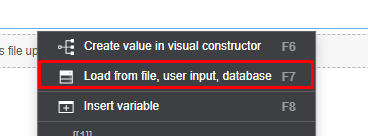
@rcd
d886ab87-daa4-4e73-8764-e10a7eb203db-image.png
54b405ee-0393-4c04-839b-924fe7398674-image.png
and then it will open source of url that downloads this photo's
Problem uploading multiple images
-
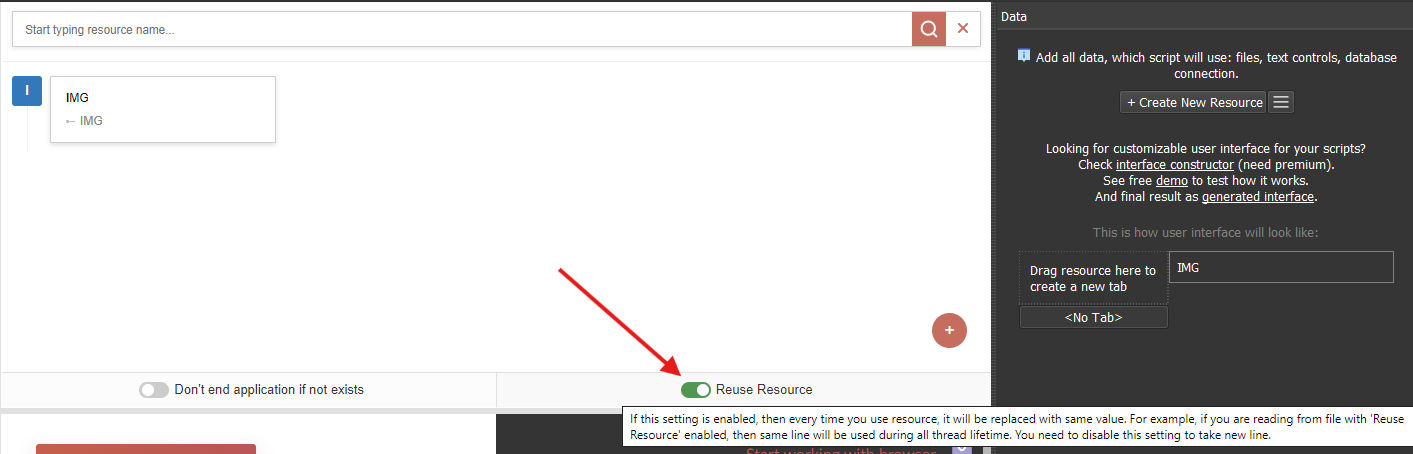
Disable this option to take other rows from the resource in one thread.
-
-
-
@to-nice
notreuse only works for resources, it doesn't work for variables.
I've attached a sample project and a video.
picload.xml
123.webm -
@m4zuper My problem is that I have several paths, and depending on the parameters it has to choose different paths.
I always have a fixed part which could be C:\Users\image, and some variable folders which could be like…C:\Users\image\dog\red
C:\Users\image\dog\black
C:\Users\image\cat\red
C:\Users\image\cat\black
I implemented it like this but it's failing. Do you have any suggestions for alternative approaches to accomplish this?
{{fixedpath|notreuse}}/[[cat]]/[[black]]
{{fixedpath|notreuse}}/[[cat]]/[[red]] -
@m4zuper creating a resource for each folder is impossible — it would mean creating too many resources. I’ve thought about it. Can you explain to me how creating variables without resources works? Did you see the previous example where I created
SET VARIABLE fixedpath/[[PATH1]]/[[PATH2]]and inserted this variable inopen fail result? Even that didn’t work. Could there be alternatives?