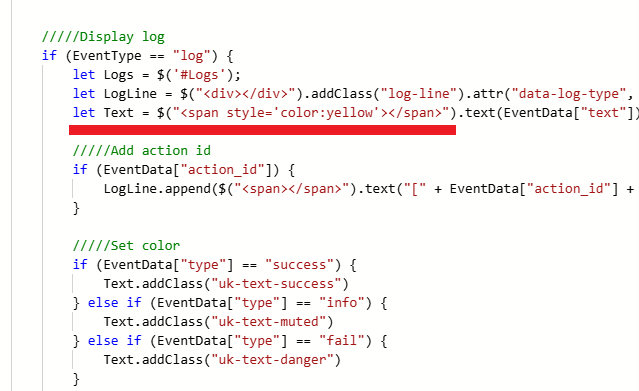
yes . i am using the custom logging tool from this form that adds color. may that be the cause of issue?
How to color logs?
-
-
@orinsamy said in How to color logs?:
When i try this it's working
log_html("<span style='color:yellow'>Test log</span>")But When i add variable it's not working
log_html("<span style='color:yellow'>[[LEAD]]</span>")Please solve my problem
https://code.mu/en/javascript/book/prime/basis/strings-concatenation/
-
I did watched this video but log not work with variable
https://www.youtube.com/watch?v=SNm_hSX4iOg(Full line not work with color)
-
-
hello there. i was looking for the answer to this question for the web interface and saw a few suggestions.
but I found a much simpler and practical way that meets my needs. i am adding it here for those who may need it in the future.
Update the place I marked in the js file like this. Edit the <span></span> text.
I preferred the yellow color. You can use another color instead of yellow.