




@robojon77 Please wait for the page to finish loading, then you can use other functions.
This error occurs when the page has not finished loading, it can cause the browser to freeze, and error occurs.
The "Wait While Element Exists" action can be used after the page loads to make sure the page is loaded, then you can perform other functions.
Bandwidth Issue
-
-
Here is an interesting discussion going on: https://community.bablosoft.com/topic/16335/best-method-s-to-minimize-compact-traffic-consumption-of-project/26
For starting out you can simply block images on the target site (.jpg, .gif, webp, png...)
-
-
@makuma said in Bandwidth Issue:
My internet package gets consumed very quickly due to files such as cache and images not being cleared each time. How can I ensure that these files are not retained or find an alternative solution?
Prerequisites:
- Always use saved browser profiles on your hard drive to ensure you are utilizing the local cache for static content.
There are several approaches you can consider:
-
Prior to running the browser in production mode, you can utilize a
cheap proxyto only save the browser cache. For example, you can browse the target website only to fill up the local browser cache. -
Implement your own proxy to load balance your traffic. For instance, traffic containing static content could be directed through a
cheap proxy, while other traffic should go through a reliableresidential proxy.
-
@sergerdn said in Bandwidth Issue:
- Always use saved browser profiles on your hard drive to ensure you are utilizing the local cache for static content.
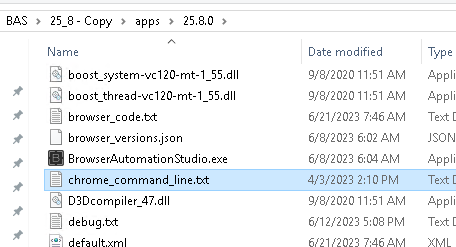
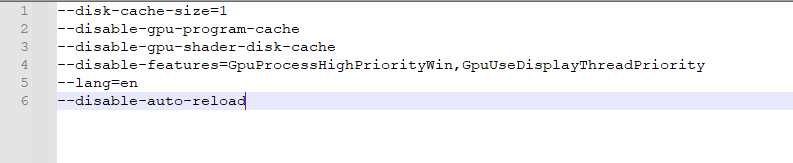
По умолчанию в командлайн кеши отключены. Поэтому как минимум надо еще убрать эту строку в командлайн.
-
-
@morpheus93 I did what you said, but since there are still many data streams running in the background, it is about 10mb to open 1 page.
-
-
@morpheus93
just delete these lines