


@sponkly This string a part of the Google cookies, I'm not sure how you get and how you want to use, in this case I give you an answer "as your question".
There are many possible way to get the value, I show you one of them.
We need to convert into JSON object, but for this we need to add "[" for the start and "]" at the end of your string, then convert into JSON object. After that you can access like an array element, in this case [0].value
Here is a short code example:
Get all links on a website
-
@World_Art u can click by image, but resourse-intensive
on your screenshot i see your selector but where is
>XPATH>on start therefore, BAS shows you that it cannot find the <a> tags.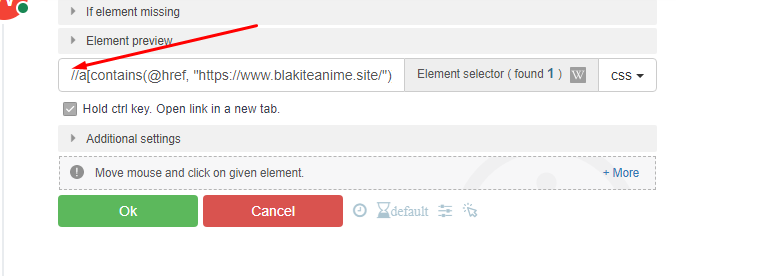
-
@World_Art you mean i change my selector type
-
@World_Art You can change it, but it will work either way, even if xpath is in css. Add
>XPATH>at the beginning. -
@Roy-Mustang How to compare links is bas and then click on selected link
-
@World_Art Depending on how you want to compare, one case will have one logic and another will have another.
Use the list module and the “Contains” action, for example, or if you have links in the resource, first convert the “resource to a list” (this is the name of the action) and then you can check it.
If you need to check a part of the link, use the “Contains” action in the string module and foreach cycle. But in these cycle paste some delay for example 100-200ms with action "Sleep"
-
@Roy-Mustang Bro i am using parse line action but when i want to parse link from parse line it show me this error:

-
@Roy-Mustang with help of this i want to click on the link which in the file
-
@World_Art Where do you want to click? If you use Google search, you need the search to show a link. If you see a link, you need to create an XPATH query for the click, for example: //a[contains(@link,‘[[PATH]]’)]
Use the “parse CSV” action instead of the outdated action.
-
@Roy-Mustang Brother i need your help again. i want to make a file which have link list but when i import this file in "read file action" it show me a single line with all links. kindly help me to break this one line into links list and then i want to use random element picker to pick a random link.
see this:
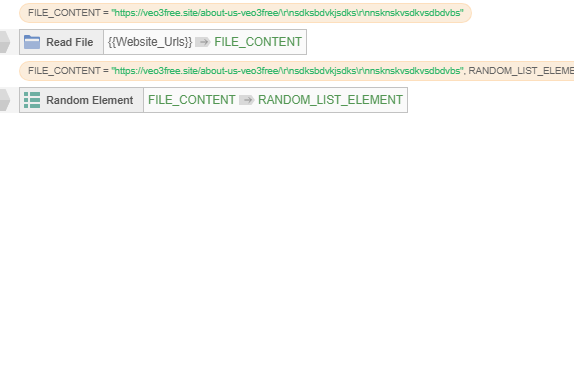
i want to split all link in lines one by one
-
@Saddamz Bro, there is an action called “Read File Into List” in the same module. Just take a closer look, or better yet, spend 2-3 hours reading each action in BAS (go to the action and read how it works) so that you know what you can do in general.
-
@Roy-Mustang Brother can we click on ads. If it is possibe so how?.
-
@Saddamz of course bro, why not, u can develop any logic possible in chrome, use >XPATH> requeste for clicks: https://devhints.io/xpath (formuls)
-
@Roy-Mustang Is there any common thing in ads
-
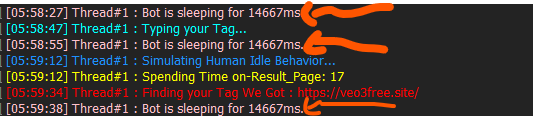
@World_Art I am using random numbers but I want the resource I have connected it to, to generate a new random number every time but it gives the same random number every time that it gave the first time, please help.
-
@Roy-Mustang Need your attension bro,help me.
-
@World_Art Unfortunately, this is a problem with this resource. Use the “Random Number” action in recording mode.
-
@Roy-Mustang Bro i want to use random time.which is i am using, i want to use new values from this option but this option not providing the new value it provides always same value which is initialy craeted.
-
@World_Art Yes, this is an issue with that resource. I don’t know what it’s related to.
I’m creating a resource - a string where I specify something like60/100, and then I do the following sequence:- Parse the resource string using “Parse CSV” with
/as the delimiter. - Generate a random number
[[VAR1]] [[VAR2]]. - Perform the action “Sleep” or “Start idle emulation.”
- Parse the resource string using “Parse CSV” with
-
@Roy-Mustang i want to generate random integer every time