Screenshot 2025-10-25 084848.png
No way to disable element preview? its preventing further work, stuck there.
I noticed this bug many times: After updating to a new version, all npm modules are gone. There is not even a hint in the script editor what modules were used. So if you use a bunch of nmp modules in your script, after updating you can guess what modules you had and manually re-install all of them.
Would be appreciated if you fix this bug with the next release.
@morpheus93 said in All NPM models are gone after updating BAS:
I noticed this bug many times: After updating to a new version, all npm modules are gone. There is not even a hint in the script editor what modules were used. So if you use a bunch of nmp modules in your script, after updating you can guess what modules you had and manually re-install all of them.
Would be appreciated if you fix this bug with the next release.
npm modules are saved in the project, when switching to a new version of BAS, all modules remain unchanged. The main rule is not to open multiple copies of BAS from the same directory and do not work with the same script file simultaneously in different copies of BAS
 M Moderator moved this topic from Feedback on
@Fox Thank you for the suggestion.
As I often need several instances of BAS running in parallel how should I set up BAS for that?
Just make copies of the whole directory "C:\Users\User\AppData\Roaming\BrowserAutomationStudio" and making different links to the BrowserAutomationStudio.exe in the different locations e.g on the desktop like BAS1, BAS2, BAS3...
Or do you have another recommendation?
Thanks.
@morpheus93 said in All NPM models are gone after updating BAS:
@Fox Thank you for the suggestion.
As I often need several instances of BAS running in parallel how should I set up BAS for that?
Just make copies of the whole directory "C:\Users\User\AppData\Roaming\BrowserAutomationStudio" and making different links to the BrowserAutomationStudio.exe in the different locations e.g on the desktop like BAS1, BAS2, BAS3...
Or do you have another recommendation?Thanks.
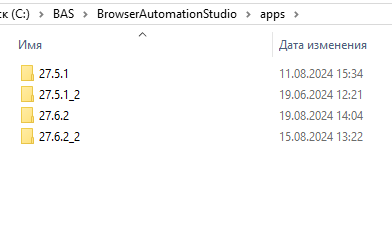
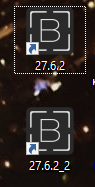
Not quite. It is enough to duplicate the desired version of BAS in the "apps" directory