

@smeckoi77 Все с этим тоже разобрался) спасибо) Сделал замену строки. Там всего 11 букв похожих)
Помогите с встроенным nodejs
-
Всем привет! Столкнулся с ситуацие, что нужно обновить определённую ячейку в гугл таблице, про особенности вызова async функций прочитал -- но заставить код работать так и не смог, вот код:
const { google } = require('googleapis');
const path = require('path');

// Путь к вашему файлу с учетными данными service account
const KEY_PATH = path.join(__dirname, 'assets/wildberries-stock-hunter-b8aa3dfe4141.json');

// ID таблицы Google Sheets
const SPREADSHEET_ID = '1GRYUMT...m2k';

// Функция для обновления ячейки
async function updateCell(sheetName, cell, value) {
    const auth = new google.auth.GoogleAuth({
        keyFile: KEY_PATH,
        scopes: ['https://www.googleapis.com/auth/spreadsheets'],
    });

    const sheets = google.sheets({ version: 'v4', auth });

    const request = {
        spreadsheetId: SPREADSHEET_ID,
        range: `${sheetName}!${cell}`,
        valueInputOption: 'RAW',
        resource: {
            values: [[value]],
        },
    };

    try {
        const response = await sheets.spreadsheets.values.update(request);
        console.log('Cell updated:', response.data);
    } catch (error) {
        console.error('Error updating cell:', error);
    }
}

// Пример использования
updateCell('Autobooking', 'A3', 'Hello, World!');
И так пробовал
await (new Promise((resolve, reject) => {
	/*Place your code here and call resolve to proceed*/

// Функция для обновления ячейки
async function updateCell(sheetName, cell, value) {
    const auth = new google.auth.GoogleAuth({
        keyFile: KEY_PATH,
        scopes: ['https://www.googleapis.com/auth/spreadsheets'],
    });

    const sheets = google.sheets({ version: 'v4', auth });

    const request = {
        spreadsheetId: SPREADSHEET_ID,
        range: `${sheetName}!${cell}`,
        valueInputOption: 'RAW',
        resource: {
            values: [[value]],
        },
    };

    try {
        const response = sheets.spreadsheets.values.update(request)
            .then(response => {
                console.log('Ответ от API:', response);
                return response;
                resolve()
            })
            .catch(error => {
                console.error('Ошибка при обновлении значений:', error);
                reject()
            });

    } catch (error) {
        console.error('Error updating cell:', error);
        reject()
    }
}

updateCell('Autobooking', 'A4', 'Hacked');
}));
И сяк
async function updateCell(sheetName, cell, value) {
    const auth = new google.auth.GoogleAuth({
        keyFile: KEY_PATH,
        scopes: ['https://www.googleapis.com/auth/spreadsheets'],
    });

    const sheets = google.sheets({ version: 'v4', auth });

    const request = {
        spreadsheetId: SPREADSHEET_ID,
        range: `${sheetName}!${cell}`,
        valueInputOption: 'RAW',
        resource: {
            values: [[value]],
        },
    };

    try {
        const response = await sheets.spreadsheets.values.update(request);
        console.log('Cell updated:', response.data);
        resolve()
    } catch (error) {
        console.error('Error updating cell:', error);
        reject()
    }
}

updateCell('Autobooking', 'A4', 'Hacked');
}));
Всё чего добился, так что печтает лог, но пустой, и таблица не обновляется.
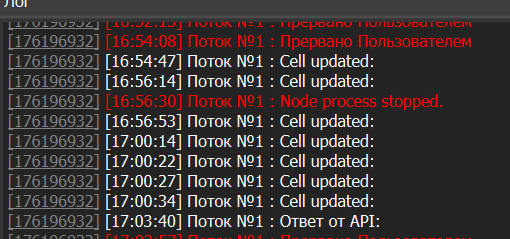
Подскажите пожалуйста, как правильно этот код вызвать в nodejs в BAS?
-
@ax-hack у вас где=то есть ошибка в коде, смотрите лог Node в файле node_log.txt
Скорей всего проблема в KEY_PATH, там вы используете глобальную переменную __dirname, но вы должны понимать, что это будет служебная директория в который бас запускает скрипты ноды, а не ваш проект