
@sergerdn I'm not saying its a bug, I'm explaining to other people how to do it properly if they are facing the error. Did you even read the post 🤦♂️
Problem uploading multiple images
-
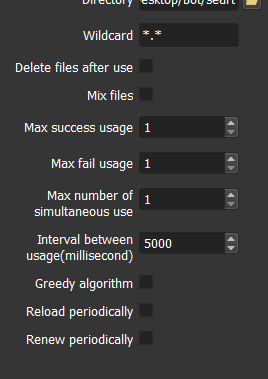
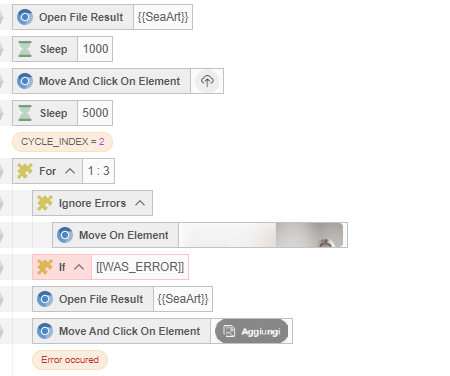
Hi everyone, as you can see from the resources I set the maximum usage = 1. From the second image you can see my script: first it takes the image from the folder, then it starts a for loop that should click another button to upload the images, but the uploaded image is always the same. Where am I going wrong?


-
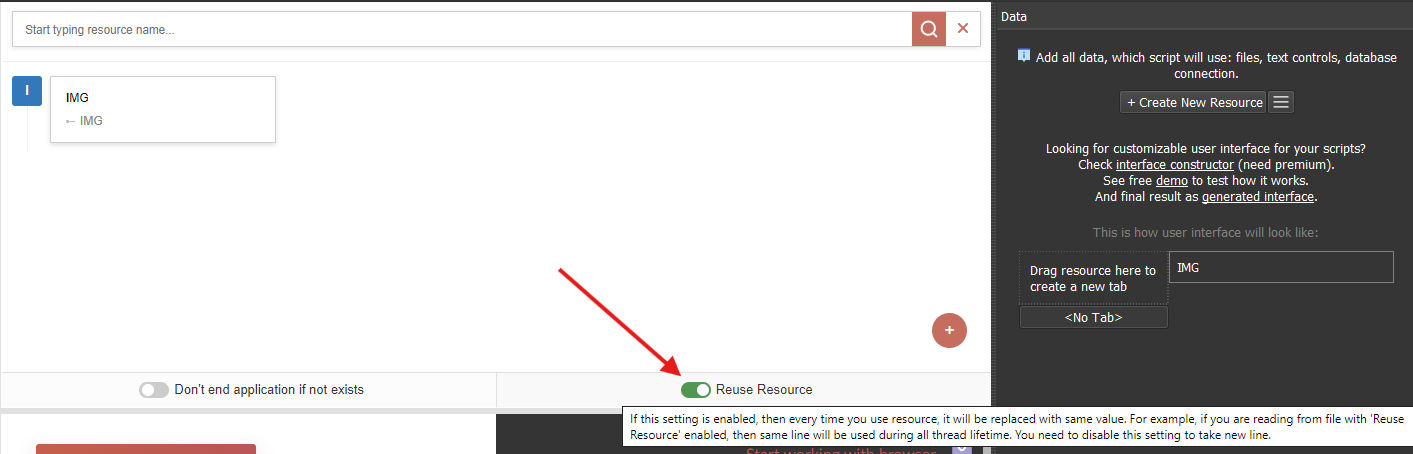
Disable this option to take other rows from the resource in one thread.

-
@to-nice
notreuse only works for resources, it doesn't work for variables.
I've attached a sample project and a video.
picload.xml
123.webm -
@m4zuper My problem is that I have several paths, and depending on the parameters it has to choose different paths.
I always have a fixed part which could be C:\Users\image, and some variable folders which could be like…C:\Users\image\dog\red
C:\Users\image\dog\black
C:\Users\image\cat\red
C:\Users\image\cat\black
I implemented it like this but it's failing. Do you have any suggestions for alternative approaches to accomplish this?
{{fixedpath|notreuse}}/[[cat]]/[[black]]
{{fixedpath|notreuse}}/[[cat]]/[[red]] -
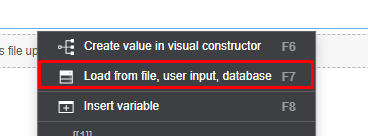
@m4zuper creating a resource for each folder is impossible — it would mean creating too many resources. I’ve thought about it. Can you explain to me how creating variables without resources works? Did you see the previous example where I created
SET VARIABLE fixedpath/[[PATH1]]/[[PATH2]]and inserted this variable inopen fail result? Even that didn’t work. Could there be alternatives?
