
I tried applying this using ChatGPT, but it didn't work for me. Can you tell me where to put this code to make my code work?
// Π€ΡΠ½ΠΊΡΠΈΡ Π΄Π»Ρ ΡΠΌΡΠ»ΡΡΠΈΠΈ Π½Π°ΠΆΠ°ΡΠΈΡ ΠΌΡΡΠΈ Π²Π½ΡΡΡΠΈ ΡΠ»Π΅ΠΌΠ΅Π½ΡΠ° <canvas data-sentry-element="Stage"> function simulateMouseClickInCanvas() { const canvas = document.querySelector('canvas[data-sentry-element="Stage"]'); if (!canvas) { console.error("ΠΠ»Π΅ΠΌΠ΅Π½Ρ <canvas> Π½Π΅ Π½Π°ΠΉΠ΄Π΅Π½."); return; } const rect = canvas.getBoundingClientRect(); // ΠΡΠ±ΠΈΡΠ°Π΅ΠΌ ΡΠ»ΡΡΠ°ΠΉΠ½ΡΠ΅ ΠΊΠΎΠΎΡΠ΄ΠΈΠ½Π°ΡΡ Π²Π½ΡΡΡΠΈ ΡΠ»Π΅ΠΌΠ΅Π½ΡΠ° <canvas> const randomX = Math.random() * rect.width + rect.left; const randomY = Math.random() * rect.height + rect.top; // Π‘ΠΎΠ·Π΄Π°ΡΠΌ ΡΠΎΠ±ΡΡΠΈΡ ΠΌΡΡΠΈ const mouseDownEvent = new MouseEvent("mousedown", { bubbles: true, cancelable: true, clientX: randomX, clientY: randomY, }); const mouseUpEvent = new MouseEvent("mouseup", { bubbles: true, cancelable: true, clientX: randomX, clientY: randomY, }); const clickEvent = new MouseEvent("click", { bubbles: true, cancelable: true, clientX: randomX, clientY: randomY, }); // ΠΠΌΡΠ»ΠΈΡΡΠ΅ΠΌ ΡΠΎΠ±ΡΡΠΈΡ canvas.dispatchEvent(mouseDownEvent); canvas.dispatchEvent(mouseUpEvent); canvas.dispatchEvent(clickEvent); } // Π€ΡΠ½ΠΊΡΠΈΡ Π΄Π»Ρ Π²ΡΠΏΠΎΠ»Π½Π΅Π½ΠΈΡ ΠΊΠ»ΠΈΠΊΠΎΠ² Ρ ΡΠ°Π½Π΄ΠΎΠΌΠ½ΠΎΠΉ Π·Π°Π΄Π΅ΡΠΆΠΊΠΎΠΉ function performRandomClicksInCanvas(maxClicks) { let clicksCount = 0; function clickWithRandomDelay() { if (clicksCount >= maxClicks) { console.log("ΠΡΠ΅ ΠΊΠ»ΠΈΠΊΠΈ Π²ΡΠΏΠΎΠ»Π½Π΅Π½Ρ"); return; } const delay = Math.random() * (2000 - 100) + 100; // Π Π°Π½Π΄ΠΎΠΌΠ½Π°Ρ Π·Π°Π΄Π΅ΡΠΆΠΊΠ° ΠΎΡ 0.1 Π΄ΠΎ 2 ΡΠ΅ΠΊΡΠ½Π΄ setTimeout(() => { simulateMouseClickInCanvas(); clicksCount++; console.log(`ΠΠ»ΠΈΠΊ ${clicksCount} Π²ΡΠΏΠΎΠ»Π½Π΅Π½ (Π·Π°Π΄Π΅ΡΠΆΠΊΠ°: ${Math.round(delay)} ΠΌΡ)`); clickWithRandomDelay(); // Π Π΅ΠΊΡΡΡΠΈΠ²Π½ΡΠΉ Π²ΡΠ·ΠΎΠ² Π΄Π»Ρ ΡΠ»Π΅Π΄ΡΡΡΠ΅Π³ΠΎ ΠΊΠ»ΠΈΠΊΠ° }, delay); } clickWithRandomDelay(); } // ΠΠ°ΠΏΡΡΠΊ Π²ΡΠΏΠΎΠ»Π½Π΅Π½ΠΈΡ 10 ΠΊΠ»ΠΈΠΊΠΎΠ² performRandomClicksInCanvas(10);Is there a way to write code that would be automatically usable in bas visual editor?
-
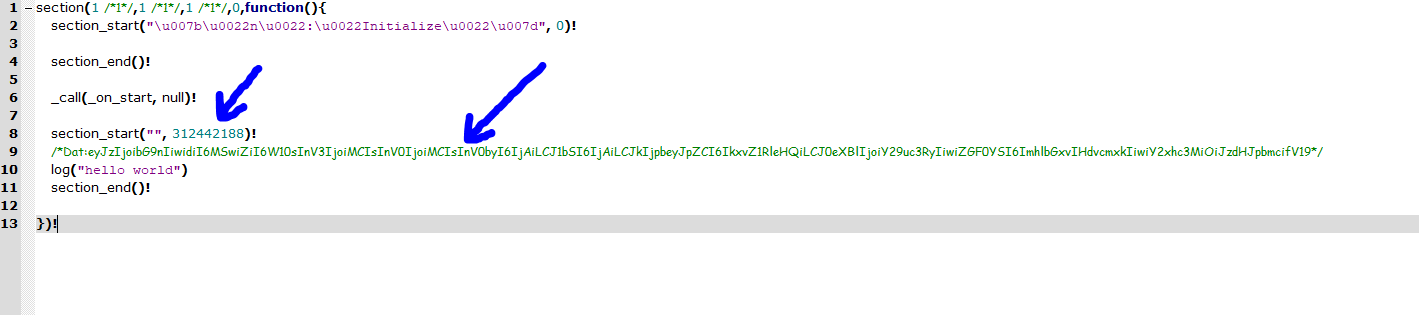
Is there way to know how the base64 green string in each action is created(I understand that it is responsible for actions show in visual editor)?
also how action's ids are assign to actions?
would any not repeating id work?the goal is to be able to write or fix .xml files that the BAS projects are stored in outside of BAS editor mode (in VScode for example)
section_start("", 312442188)!
/Dat:eyJzIjoibG9nIiwidiI6MSwiZiI6W10sInV3IjoiMCIsInV0IjoiMCIsInV0byI6IjAiLCJ1bSI6IjAiLCJkIjpbeyJpZCI6IkxvZ1RleHQiLCJ0eXBlIjoiY29uc3RyIiwiZGF0YSI6ImhlbGxvIHdvcmxkIiwiY2xhc3MiOiJzdHJpbmcifV19/
log("hello world")
section_end()!

-
if you just decode it you will see it is json with info about action itself so you can reverseengeneer that
This is a Base64-encoded JSON string. After decoding, here's the content:
json
{
"s": "log",
"v": 1,
"f": [],
"uw": "0",
"ut": "0",
"uto": "0",
"um": "0",
"d": [
{
"id": "LogText",
"type": "constr",
"data": "hello world",
"class": "string"
}
]
}