

@nadenceto88 Then build your logic using the “Solve captcha with clicks” action
But it is better to use a ready-made solution, especially one that is well made.
Otohits autosurf problem
-
Link to script - Google Drive
Hello i am facing issues while automating otohits.net autosurf.My Config:

What works:
-
Log in works
-
Auto Surf starts up
What Does not work:
- Browser loops surf security window (Before browsing starts up there is a surf security window to verify if JavaScript/CSS/Images are working)
How to reproduce this error:
- Login with a IP that has not surfed before and start Autosurf(you can use the link i posted to download bot configuration)
BAS Log - Empty
Google Chromes console - Empty/No errorsGIF Describing my problem-
Click HereMask doesnt seem to work too ,it displays all websites even after enabling it
Is there any way to fix it ?
or Is there any way to log the whole action performed by website?
Thanks you -
-
@namansha Thanks for detailed description.
Browser loops surf security window (Before browsing starts up there is a surf security window to verify if JavaScript/CSS/Images are working)
The issue is that canvas in BAS is disabled by default(to avoid browser detection by canvas fingerprint), you can enable it and autosurf will work.
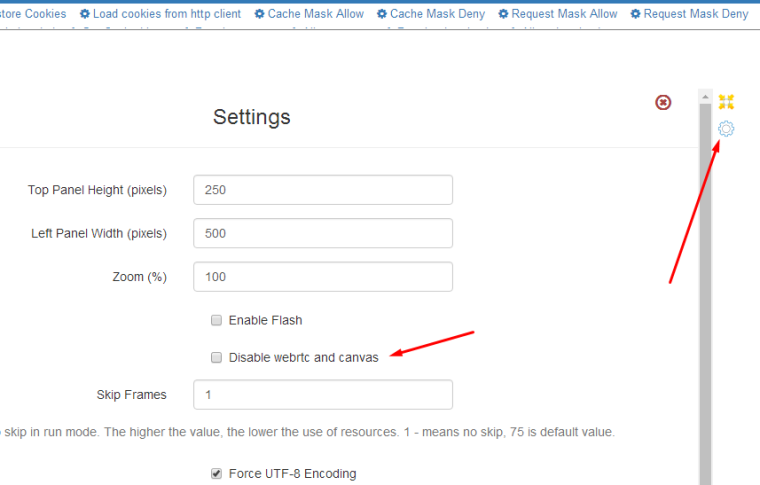
Mask doesnt seem to work too ,it displays all websites even after enabling it
I see, that you enabled requests to
otohits.net, but it does nothing, all sites are enabled by default. If you want to allow access only tootohits.net, than you need first disable all url*and than enableotohits.net.See this article for more details.
http://wiki.bablosoft.com/doku.php?id=how_to_restrict_access_to_certain_urlsor Is there any way to log the whole action performed by website?
What do you mean by actions?
BAS log is performed only when user explicitly cals Log action or when thread gets restarted. You can also see some advanced log in file %AppData%\BrowserAutomationStudio\apps\17.8.0\worker_log.txt

