@Alex84 не понял как это относится к моей проблеме
Запуск модуля на node js
-
При запуске скрипта с модулем на node js вылазит ошибка
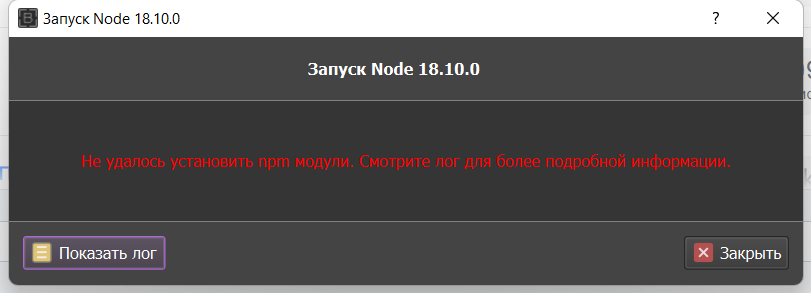
npm WARN cleanup Failed to remove some directories [
npm WARN cleanup   [
npm WARN cleanup     'C:\\Users\\explo\\AppData\\Roaming\\BrowserAutomationStudio\\apps\\26.2.0\\e\\cache.BEu5\\distr\\app\\node_modules\\canvas',
npm WARN cleanup     [Error: EBUSY: resource busy or locked, rmdir 'C:\Users\explo\AppData\Roaming\BrowserAutomationStudio\apps\26.2.0\e\cache.BEu5\distr\app\node_modules\canvas'] {
npm WARN cleanup       errno: -4082,
npm WARN cleanup       code: 'EBUSY',
npm WARN cleanup       syscall: 'rmdir',
npm WARN cleanup       path: 'C:\\Users\\explo\\AppData\\Roaming\\BrowserAutomationStudio\\apps\\26.2.0\\e\\cache.BEu5\\distr\\app\\node_modules\\canvas'
npm WARN cleanup     }
npm WARN cleanup   ]
npm WARN cleanup ]
npm timing reify:rollback:createSparse Completed in 662ms
npm timing reify:rollback:retireShallow Completed in 94ms
npm timing command:install Completed in 4733ms
npm verb stack Error: command failed
npm verb stack     at ChildProcess.<anonymous> (C:\Users\explo\AppData\Roaming\BrowserAutomationStudio\apps\26.2.0\e\cache.BEu5\distr\node_modules\npm\node_modules\@npmcli\promise-spawn\lib\index.js:63:27)
npm verb stack     at ChildProcess.emit (node:events:513:28)
npm verb stack     at maybeClose (node:internal/child_process:1091:16)
npm verb stack     at ChildProcess._handle.onexit (node:internal/child_process:302:5)
npm verb pkgid gl@5.0.3
npm verb cwd C:\Users\explo\AppData\Roaming\BrowserAutomationStudio\apps\26.2.0\e\cache.BEu5\distr\app
npm verb Windows_NT 10.0.22000
npm verb node v18.10.0
npm verb npm  v8.19.2
npm ERR! code 1
npm ERR! path C:\Users\explo\AppData\Roaming\BrowserAutomationStudio\apps\26.2.0\e\cache.BEu5\distr\app\node_modules\gl
npm ERR! command failed
npm ERR! command C:\Windows\system32\cmd.exe /d /s /c prebuild-install || node-gyp rebuild
npm ERR! prebuild-install info begin Prebuild-install version 7.1.1
npm ERR! prebuild-install info looking for local prebuild @ prebuilds\gl-v5.0.3-node-v108-win32-x64.tar.gz
npm ERR! prebuild-install info looking for cached prebuild @ C:\Users\explo\AppData\Local\npm-cache\_prebuilds\b98649-gl-v5.0.3-node-v108-win32-x64.tar.gz
npm ERR! prebuild-install http request GET https://github.com/stackgl/headless-gl/releases/download/v5.0.3/gl-v5.0.3-node-v108-win32-x64.tar.gz
npm ERR! prebuild-install http 404 https://github.com/stackgl/headless-gl/releases/download/v5.0.3/gl-v5.0.3-node-v108-win32-x64.tar.gz
npm ERR! prebuild-install warn install No prebuilt binaries found (target=18.18.0 runtime=node arch=x64 libc= platform=win32)
npm ERR! gyp info it worked if it ends with ok
npm ERR! gyp verb cli [
npm ERR! gyp verb cli   'C:\\Program Files\\nodejs\\node.exe',
npm ERR! gyp verb cli   'C:\\Users\\explo\\AppData\\Roaming\\BrowserAutomationStudio\\apps\\26.2.0\\e\\cache.BEu5\\distr\\app\\node_modules\\gl\\node_modules\\node-gyp\\bin\\node-gyp.js',
npm ERR! gyp verb cli   'rebuild'
npm ERR! gyp verb cli ]
npm ERR! gyp info using node-gyp@9.4.0
npm ERR! gyp info using node@18.18.0 | win32 | x64
npm ERR! gyp verb command rebuild []
npm ERR! gyp verb command clean []
npm ERR! gyp verb clean removing "build" directory
npm ERR! gyp verb command configure []
npm ERR! gyp verb find Python Python is not set from command line or npm configuration
npm ERR! gyp verb find Python Python is not set from environment variable PYTHON
npm ERR! gyp verb find Python checking if "python3" can be used
npm ERR! gyp verb find Python - executing "python3" to get executable path
npm ERR! gyp verb find Python - "python3" is not in PATH or produced an error
npm ERR! gyp verb find Python checking if "python" can be used
npm ERR! gyp verb find Python - executing "python" to get executable path
npm ERR! gyp verb find Python - executable path is "C:\Users\explo\AppData\Local\Programs\Python\Python311\python.exe"
npm ERR! gyp verb find Python - executing "C:\Users\explo\AppData\Local\Programs\Python\Python311\python.exe" to get version
npm ERR! gyp verb find Python - version is "3.11.3"
npm ERR! gyp info find Python using Python version 3.11.3 found at "C:\Users\explo\AppData\Local\Programs\Python\Python311\python.exe"
npm ERR! gyp verb get node dir no --target version specified, falling back to host node version: 18.18.0
npm ERR! gyp verb command install [ '18.18.0' ]
npm ERR! gyp verb install input version string "18.18.0"
npm ERR! gyp verb install installing version: 18.18.0
npm ERR! gyp verb install --ensure was passed, so won't reinstall if already installed
npm ERR! gyp verb install version is already installed, need to check "installVersion"
npm ERR! gyp verb got "installVersion" 11
npm ERR! gyp verb needs "installVersion" 11
npm ERR! gyp verb install version is good
npm ERR! gyp verb on Windows; need to check node.lib
npm ERR! gyp verb get node dir target node version installed: 18.18.0
npm ERR! gyp verb build dir attempting to create "build" dir: C:\Users\explo\AppData\Roaming\BrowserAutomationStudio\apps\26.2.0\e\cache.BEu5\distr\app\node_modules\gl\build
npm ERR! gyp verb build dir "build" dir needed to be created? Yes
npm ERR! gyp verb find VS msvs_version not set from command line or npm config
npm ERR! gyp verb find VS VCINSTALLDIR not set, not running in VS Command Prompt
npm ERR! gyp verb find VS checking VS2022 (17.6.33815.320) found at:
npm ERR! gyp verb find VS "C:\Program Files\Microsoft Visual Studio\2022\Community"
npm ERR! gyp verb find VS - found "Visual Studio C++ core features"
npm ERR! gyp verb find VS - missing any VC++ toolset
npm ERR! gyp verb find VS could not find a version of Visual Studio 2017 or newer to use
npm ERR! gyp verb find VS looking for Visual Studio 2015
npm ERR! gyp verb find VS - not found
npm ERR! gyp verb find VS not looking for VS2013 as it is only supported up to Node.js 8
npm ERR! gyp ERR! find VS
npm ERR! gyp ERR! find VS msvs_version not set from command line or npm config
npm ERR! gyp ERR! find VS VCINSTALLDIR not set, not running in VS Command Prompt
npm ERR! gyp ERR! find VS checking VS2022 (17.6.33815.320) found at:
npm ERR! gyp ERR! find VS "C:\Program Files\Microsoft Visual Studio\2022\Community"
npm ERR! gyp ERR! find VS - found "Visual Studio C++ core features"
npm ERR! gyp ERR! find VS - missing any VC++ toolset
npm ERR! gyp ERR! find VS could not find a version of Visual Studio 2017 or newer to use
npm ERR! gyp ERR! find VS looking for Visual Studio 2015
npm ERR! gyp ERR! find VS - not found
npm ERR! gyp ERR! find VS not looking for VS2013 as it is only supported up to Node.js 8
npm ERR! gyp ERR! find VS
npm ERR! gyp ERR! find VS **************************************************************
npm ERR! gyp ERR! find VS You need to install the latest version of Visual Studio
npm ERR! gyp ERR! find VS including the "Desktop development with C++" workload.
npm ERR! gyp ERR! find VS For more information consult the documentation at:
npm ERR! gyp ERR! find VS https://github.com/nodejs/node-gyp#on-windows
npm ERR! gyp ERR! find VS **************************************************************
npm ERR! gyp ERR! find VS
npm ERR! gyp ERR! configure error
npm ERR! gyp ERR! stack Error: Could not find any Visual Studio installation to use
npm ERR! gyp ERR! stack     at VisualStudioFinder.fail (C:\Users\explo\AppData\Roaming\BrowserAutomationStudio\apps\26.2.0\e\cache.BEu5\distr\app\node_modules\gl\node_modules\node-gyp\lib\find-visualstudio.js:122:47)
npm ERR! gyp ERR! stack     at C:\Users\explo\AppData\Roaming\BrowserAutomationStudio\apps\26.2.0\e\cache.BEu5\distr\app\node_modules\gl\node_modules\node-gyp\lib\find-visualstudio.js:75:16
npm ERR! gyp ERR! stack     at VisualStudioFinder.findVisualStudio2013 (C:\Users\explo\AppData\Roaming\BrowserAutomationStudio\apps\26.2.0\e\cache.BEu5\distr\app\node_modules\gl\node_modules\node-gyp\lib\find-visualstudio.js:380:14)
npm ERR! gyp ERR! stack     at C:\Users\explo\AppData\Roaming\BrowserAutomationStudio\apps\26.2.0\e\cache.BEu5\distr\app\node_modules\gl\node_modules\node-gyp\lib\find-visualstudio.js:71:14
npm ERR! gyp ERR! stack     at C:\Users\explo\AppData\Roaming\BrowserAutomationStudio\apps\26.2.0\e\cache.BEu5\distr\app\node_modules\gl\node_modules\node-gyp\lib\find-visualstudio.js:401:16
npm ERR! gyp ERR! stack     at C:\Users\explo\AppData\Roaming\BrowserAutomationStudio\apps\26.2.0\e\cache.BEu5\distr\app\node_modules\gl\node_modules\node-gyp\lib\util.js:54:7
npm ERR! gyp ERR! stack     at C:\Users\explo\AppData\Roaming\BrowserAutomationStudio\apps\26.2.0\e\cache.BEu5\distr\app\node_modules\gl\node_modules\node-gyp\lib\util.js:33:16
npm ERR! gyp ERR! stack     at ChildProcess.exithandler (node:child_process:430:5)
npm ERR! gyp ERR! stack     at ChildProcess.emit (node:events:517:28)
npm ERR! gyp ERR! stack     at maybeClose (node:internal/child_process:1098:16)
npm ERR! gyp ERR! System Windows_NT 10.0.22000
npm ERR! gyp ERR! command "C:\\Program Files\\nodejs\\node.exe" "C:\\Users\\explo\\AppData\\Roaming\\BrowserAutomationStudio\\apps\\26.2.0\\e\\cache.BEu5\\distr\\app\\node_modules\\gl\\node_modules\\node-gyp\\bin\\node-gyp.js" "rebuild"
npm ERR! gyp ERR! cwd C:\Users\explo\AppData\Roaming\BrowserAutomationStudio\apps\26.2.0\e\cache.BEu5\distr\app\node_modules\gl
npm ERR! gyp ERR! node -v v18.18.0
npm ERR! gyp ERR! node-gyp -v v9.4.0
npm ERR! gyp ERR! not ok
npm verb exit 1
npm timing npm Completed in 4848ms
npm verb unfinished npm timer reify 1696252104212
npm verb unfinished npm timer reify:build 1696252106761
npm verb unfinished npm timer build 1696252106761
npm verb unfinished npm timer build:deps 1696252106761
npm verb unfinished npm timer build:run:install 1696252106807
npm verb unfinished npm timer build:run:install:node_modules/canvas 1696252106807
npm verb unfinished npm timer build:run:install:node_modules/gl 1696252106830
npm verb code 1

npm ERR! A complete log of this run can be found in:
npm ERR!     C:\Users\explo\AppData\Local\npm-cache\_logs\2023-10-02T13_08_24_097Z-debug-0.log

[16:08:28.973] Failed to install npm modules
[16:08:28.973] Autoclean current folder becuase of error C:/Users/explo/AppData/Roaming/BrowserAutomationStudio/apps/26.2.0/e/db6f.BEu5
[16:08:28.973] Autoclean current cache C:/Users/explo/AppData/Roaming/BrowserAutomationStudio/apps/26.2.0/e/cache.BEu5
У человека, который делал модуль - работает.
В чём может быть дело? -
@fuckyep said in Запуск модуля на node js:
pm ERR! gyp verb find VS VCINSTALLDIR not set, not running in VS Command Prompt
npm ERR! gyp verb find VS checking VS2022 (17.6.33815.320) found at:
npm ERR! gyp verb find VS "C:\Program Files\Microsoft Visual Studio\2022\Community"
npm ERR! gyp verb find VS - found "Visual Studio C++ core features"
npm ERR! gyp verb find VS - missing any VC++ toolset <<<<== HEREВероятно, чего-то не хватает.
@fuckyep said in Запуск модуля на node js:
Visual studio стоит на пк
Этого не достаточно, нужно еще поставить https://learn.microsoft.com/en-us/cpp/build/building-on-the-command-line?view=msvc-170
-
-
@sergerdn ```
npm ERR! gyp info it worked if it ends with ok
npm ERR! gyp verb cli [
npm ERR! gyp verb cli 'C:\Program Files\nodejs\node.exe',
npm ERR! gyp verb cli 'C:\Users\explo\AppData\Roaming\BrowserAutomationStudio\apps\26.2.0\e\cache.wPeK\distr\app\node_modules\gl\node_modules\node-gyp\bin\node-gyp.js',
npm ERR! gyp verb cli 'rebuild'
npm ERR! gyp verb cli ]
npm ERR! gyp info using node-gyp@9.4.0
npm ERR! gyp info using node@18.18.0 | win32 | x64
npm ERR! gyp verb command rebuild []
npm ERR! gyp verb command clean []
npm ERR! gyp verb clean removing "build" directory
npm ERR! gyp verb command configure []
npm ERR! gyp verb find Python Python is not set from command line or npm configuration
npm ERR! gyp verb find Python Python is not set from environment variable PYTHON
npm ERR! gyp verb find Python checking if "python3" can be used
npm ERR! gyp verb find Python - executing "python3" to get executable path
npm ERR! gyp verb find Python - "python3" is not in PATH or produced an error
npm ERR! gyp verb find Python checking if "python" can be used
npm ERR! gyp verb find Python - executing "python" to get executable path
npm ERR! gyp verb find Python - executable path is "C:\Users\explo\AppData\Local\Programs\Python\Python311\python.exe"
npm ERR! gyp verb find Python - executing "C:\Users\explo\AppData\Local\Programs\Python\Python311\python.exe" to get version
npm ERR! gyp verb find Python - version is "3.11.3"
npm ERR! gyp info find Python using Python version 3.11.3 found at "C:\Users\explo\AppData\Local\Programs\Python\Python311\python.exe"
npm ERR! gyp verb get node dir no --target version specified, falling back to host node version: 18.18.0
npm ERR! gyp verb command install [ '18.18.0' ]
npm ERR! gyp verb install input version string "18.18.0"
npm ERR! gyp verb install installing version: 18.18.0
npm ERR! gyp verb install --ensure was passed, so won't reinstall if already installed
npm ERR! gyp verb install version is already installed, need to check "installVersion"
npm ERR! gyp verb got "installVersion" 11
npm ERR! gyp verb needs "installVersion" 11
npm ERR! gyp verb install version is good
npm ERR! gyp verb on Windows; need to check node.lib
npm ERR! gyp verb get node dir target node version installed: 18.18.0
npm ERR! gyp verb build dir attempting to create "build" dir: C:\Users\explo\AppData\Roaming\BrowserAutomationStudio\apps\26.2.0\e\cache.wPeK\distr\app\node_modules\gl\build
npm ERR! gyp verb build dir "build" dir needed to be created? Yes
npm ERR! gyp verb find VS msvs_version not set from command line or npm config
npm ERR! gyp verb find VS VCINSTALLDIR not set, not running in VS Command Prompt
npm ERR! gyp verb find VS checking VS2022 (17.6.33815.320) found at:
npm ERR! gyp verb find VS "C:\Program Files\Microsoft Visual Studio\2022\Community"
npm ERR! gyp verb find VS - found "Visual Studio C++ core features"
npm ERR! gyp verb find VS - missing any VC++ toolset
npm ERR! gyp verb find VS checking VS2022 (17.7.34031.279) found at:
npm ERR! gyp verb find VS "C:\Program Files (x86)\Microsoft Visual Studio\2022\BuildTools"
npm ERR! gyp verb find VS - found "Visual Studio C++ core features"
npm ERR! gyp verb find VS - missing any VC++ toolset
npm ERR! gyp verb find VS could not find a version of Visual Studio 2017 or newer to use
npm ERR! gyp verb find VS looking for Visual Studio 2015
npm ERR! gyp verb find VS - not found
npm ERR! gyp verb find VS not looking for VS2013 as it is only supported up to Node.js 8
npm ERR! gyp ERR! find VS
npm ERR! gyp ERR! find VS msvs_version not set from command line or npm config
npm ERR! gyp ERR! find VS VCINSTALLDIR not set, not running in VS Command Prompt
npm ERR! gyp ERR! find VS checking VS2022 (17.6.33815.320) found at:
npm ERR! gyp ERR! find VS "C:\Program Files\Microsoft Visual Studio\2022\Community"
npm ERR! gyp ERR! find VS - found "Visual Studio C++ core features"
npm ERR! gyp ERR! find VS - missing any VC++ toolset
npm ERR! gyp ERR! find VS checking VS2022 (17.7.34031.279) found at:
npm ERR! gyp ERR! find VS "C:\Program Files (x86)\Microsoft Visual Studio\2022\BuildTools"
npm ERR! gyp ERR! find VS - found "Visual Studio C++ core features"
npm ERR! gyp ERR! find VS - missing any VC++ toolset
npm ERR! gyp ERR! find VS could not find a version of Visual Studio 2017 or newer to use
npm ERR! gyp ERR! find VS looking for Visual Studio 2015
npm ERR! gyp ERR! find VS - not found
npm ERR! gyp ERR! find VS not looking for VS2013 as it is only supported up to Node.js 8
npm ERR! gyp ERR! find VS
npm ERR! gyp ERR! find VS **************************************************************
npm ERR! gyp ERR! find VS You need to install the latest version of Visual Studio
npm ERR! gyp ERR! find VS including the "Desktop development with C++" workload.
npm ERR! gyp ERR! find VS For more information consult the documentation at:
npm ERR! gyp ERR! find VS https://github.com/nodejs/node-gyp#on-windows
npm ERR! gyp ERR! find VS **************************************************************
npm ERR! gyp ERR! find VS
npm ERR! gyp ERR! configure error -
@fuckyep said in Запуск модуля на node js:
npm ERR! gyp ERR! find VS You need to install the latest version of Visual Studio
npm ERR! gyp ERR! find VS including the "Desktop development with C++" workload.
npm ERR! gyp ERR! find VS For more information consult the documentation at:
npm ERR! gyp ERR! find VS https://github.com/nodejs/node-gyp#on-windowsСделал все, что написано по ссылке и все равно не помогло?
-
Теперь вылазит такая ошибка:
1 - [763966521] Error: Command failed with exit code 1: ffmpeg -f lavfi -i anullsrc=channel_layout=stereo:sample_rate=44100 -sample_fmt s32 -ar 48000 -t 4 -c:a flac -y C:\Users\explo\OneDrive\Desktop\Новая папка\video\editly-tmp-Ot-Q8jtpPGTemF59CUR7s\clip0-audio.flac"ffmpeg" �� ���� ����७��� ��� ���譥�
��������, �ᯮ��塞�� �ணࠬ��� ��� ������ 䠩���. -
-
@fuckyep said in Запуск модуля на node js:
уже более 2 недель не получается разобраться с этим.
Не факт, что и я смогу решить. Вероятно, смогу, но не 100%.
И я не оказывают услуг в помощи установки скриптов/модулей и так далее за деньги, если эти скрипты написаны не мной.
@fuckyep said in Запуск модуля на node js:
У человека, который делал модуль - работает.
Вероятно, самое разумное, обратится к нему.
-
@fuckyep said in Запуск модуля на node js:
Теперь вылазит такая ошибка:
1 - [763966521] Error: Command failed with exit code 1: ffmpeg -f lavfi -i anullsrc=channel_layout=stereo:sample_rate=44100 -sample_fmt s32 -ar 48000 -t 4 -c:a flac -y C:\Users\explo\OneDrive\Desktop\Новая папка\video\editly-tmp-Ot-Q8jtpPGTemF59CUR7s\clip0-audio.flac"ffmpeg" �� ���� ����७��� ��� ���譥�
��������, �ᯮ��塞�� �ணࠬ��� ��� ������ 䠩���.ffmpeg стоит на компе? И он есть в PATH?
-
@sergerdn said in Запуск модуля на node js:
Вероятно, самое разумное, обратится к нему.
Что я и написал в первом посте )
-
@UserTrue said in Запуск модуля на node js:
Что я и написал в первом посте )
В идеальном мире, конечно, разработчик должен писать документацию по установке вместе со своими скриптами. И в таком же идеальном мире заказчик должен это оплачивать.
Хотя у меня самого был опыт в незапамятные времена, когда заказчик отказался от документации по установке скриптов. Спустя полгода у него сдох сервер, а на новый он перенести не может, так как не знает как.
И бэкапов нет образа сервера, хотя я ему его специально делал, так как нет доков по установке. А он поленился его скачать к себе на компьютер. И бэкап умер вместе с сервером и хостером.
Писал мне письма еще полгода, а я уже и сам не помню, что я там понаделал для него, для меня самого с нуля разбираться надо уже. Доков то нет. И тестов тоже нет, так как заказчик отказался и это оплачивать. А заказчик уже все бизнес процессы завязал на мои скрипты, за которые заплатил вообще-то довольно низкую цену.
Еще спустя полгода заказчик продал свою контору.
Понятно, что это история совсем крайний вариант, и тем не менее.
-
@sergerdn Сомневаюсь, что за 3 дня исполнитель мог пропасть)
-
@UserTrue said in Запуск модуля на node js:
@sergerdn Сомневаюсь, что за 3 дня исполнитель мог пропасть)
Да понятия не имею. Мораль истории, что я написал выше, документация обязана быть.
И исполнительно обязан установить на сервер заказчика результат своей работы. И заказчику совсем не обязательно знать, что с него отдельно взяли на это деньги, так как иначе есть соблазн отказаться и сэкономить.Каждый последующий программист для заказчика всегда будет дороже, так как опыт растет и у заказчика тоже и ему нужен все более опытный человек.
Вероятно, топикастеру надо или и дальше пытаться делать все самостоятельно или искать человека, кто готов будет сделать за него его задачи за отдельные деньги за "ровно тоже самое, за что он уже заплатил". И, вероятно, платить еще раз и, вероятно, несколько больше.
На форуме искать помощи долго и не прогнозируемо, зато бесплатно.
-
-