

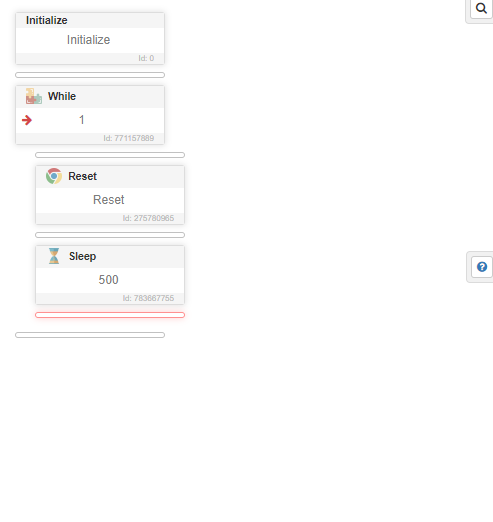

image.png
i use like this
Memory leak
-
Hi, some of my customers are experiencing heavy memory leaks in just some hours:

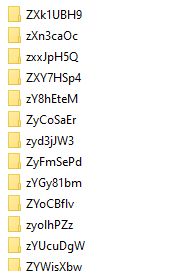
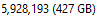
I've seen on this forum that @support has fixed a memory leak for "reset" function few months ago, I'm also using the reset function and I guess this is where it is being leaked
Would you please look into that and let me know ? Thank you
-
Hey @Fox @support
I am still experiencing the issue and found exactly how you can replicate it.Make a script looping through "Reset" function :
-> Run the script on any computer, it will work normally
-> Compile the script, and run it on any computer you will have insane data leakSeems like compiling the script for my customers to use is the reason why it happens.
-
-
-
@gudolik said in Memory leak:
My customers also complaining from same issue @support and i dont use reset in my scripts
You can use the very old and well-known approach: just clean all directories in the profile directory with timestamps more than 30 minutes old, for example.
Or, even better, with the latest access time feature.NOT tested:
- Example 1
# Note: This script deletes directories based on their last access time. # Define the path to the "prof" directory $directoryPath = "C:\path\to\prof" # Get the current time $currentTime = Get-Date # Find and delete directories older than 30 minutes based on last access time Get-ChildItem -Path $directoryPath -Directory | Where-Object { # Check if the directory was last accessed more than 30 minutes ago ($currentTime - $_.LastAccessTime).TotalMinutes -gt 30 } | Remove-Item -Recurse -Force- Example 2
More advanced script: It creates a lock file at the start to prevent multiple scripts from running simultaneously on the same directory.
# Define the path to the "prof" directory $directoryPath = "C:\path\to\prof" # Define the lock file path $lockFilePath = "$directoryPath\.lock" function LockFileIsStale { $lockFile = Get-Item -Path $lockFilePath -ErrorAction SilentlyContinue if ($null -ne $lockFile) { $ageMinutes = (New-TimeSpan -Start $lockFile.LastWriteTime -End (Get-Date)).TotalMinutes return $ageMinutes -gt 30 } return $true } try { # Check for an existing lock file and determine if it's stale if (Test-Path -Path $lockFilePath) { if (-not (LockFileIsStale)) { Write-Host "Another instance is running or lock is not stale. Exiting..." exit } else { Write-Host "Lock file is stale. Proceeding with cleanup..." } } # Create or update the lock file to indicate this script instance is running $null = New-Item -Path $lockFilePath -ItemType File -Force Write-Host "Lock file created/updated. Proceeding with cleanup..." # Get the current time $currentTime = Get-Date # Find and delete directories older than 30 minutes based on last access time Get-ChildItem -Path $directoryPath -Directory | Where-Object { # Check if the directory was last accessed more than 30 minutes ago ($currentTime - $_.LastAccessTime).TotalMinutes -gt 30 } | ForEach-Object { Remove-Item -Path $_.FullName -Recurse -Force Write-Host "Deleted: $($_.FullName)" } } catch { Write-Host "An error occurred: $_" } finally { # Ensure the lock file is removed after the work is done if (Test-Path -Path $lockFilePath) { Remove-Item -Path $lockFilePath Write-Host "Lock file removed. Cleanup completed." } } -
I found this module with this option (but did not use it, so I am not 100% sure how it work)
http://community.bablosoft.com/post/162258
