@radb0310 Thank you for the answer, can you please elaborate more
i want to download a file also, but i can't find a way to choose a location for it. And also i can't grab the URL of the file from the website.
when i click on the button i have this message :
(File is downloading : BrowserautomationStudio is downloading file. You can wait for it and obtain file name with "Wait File Download" action.)
foreach mix file
-
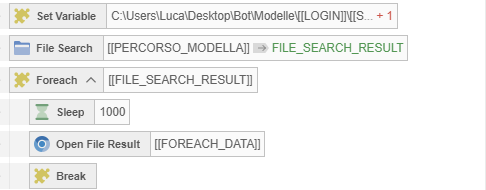
@Fox @m4zuper Given the impossibility (at least so far) of picking a random file in a subfolder with Resource, I managed to achieve this result with: File search - foreach, but the problem is that it always takes the 1st photo. Is there a way to make this random, i.e., a mix line? I thought about using create list, but I would have to set up countless foreach loops. Another question: how can I delete the file once it’s been used?
-
You could create a function to read all to a lis; -> roll a random number between MIN 0 & MAX (length list) -> get details by index, read that certain file. Also delete that certain file using Filesystems functions?
-
A. Pick random folder;
B. Read files to list
C. Roll random number between 1 and list length
D. Get image by index from random number -
@Huntenkill
Thank you for your help, but I don’t know how many files there are; it could be 1 file or 50 files, so I couldn’t even use a random number 1-3 -
Can you PM me with a small sample of how you've got it setup?
The folder structure that is.&&
If you would do a random selection yourself: what would the result be if you selected something from the 'sample'.
I think it's easily achieveable with File Search -> Ele numb -> rand num -> get element from list -> File search (1 tree lower from random File search -> Ele numb -> rand num -> get element
-Root
-random subdir
-random image from the selected subdir -
@Huntenkill yes thankyou for you help i send you now
-
@Huntenkill You’re the best, it works perfectly!!!
