







@cruz нашел причину - масштаб 95% в настройках. при 100% все норм, при 90% тоже
b5e531de-c72f-4c75-b26b-409943cf21da-image.png
Выпущена 26.5.0 версия BrowserAutomationStudio
-
В этом релизе мы добавили возможность генерировать код BAS с помощью текстового запроса.
Видео: AI generation
Ограничения.
- Поддерживаются не все модули. Даже те, которые поддерживаются, могут выдавать некорректные результаты.
- Тестировались только запросы на английском. Другие языки могут работать, а могут и нет.
- Создание функций не поддерживается.
- Созданные селекторы требуют настройки.
- Пока не поддерживаются >MATCH> и >AT> модификаторы.
- На данный момент генерация кода бесплатная, позже потребуется либо openai ключ, либо какой-то другой вид подписки.
- Генератор может перестать работать в любой момент.
Спасибо @Fox за добавление поддержки части модулей.
Другие изменения:
- Версия Chrome была обновлена до 120.0.6099.63
- Исправлена генерация селекторов для циклов.
- Исправлен метод обнаружения подмены canvas с помощью svg.
- Улучшена эмуляция некоторых факторов отпечатка актуальных для мобильных платформ: акселерометр, гироскоп и т. д.
- Добавлена эмуляция новых параметров webgpu.
26.5.1Изучили одну защиту, улучшили эмуляцию отпечатков.
Быстрый способ решить любые проблемы с антидетект https://community.bablosoft.com/topic/12198
-
AI FRAUD да есть же!)
потом будет, обойди пожалуйста антифрод инстаграма и сделай все на запросах -
Мучаю AI generation уже часа полтора, никак не может выдать мне нужный код. Наверное, я хреновый prompt инженер.
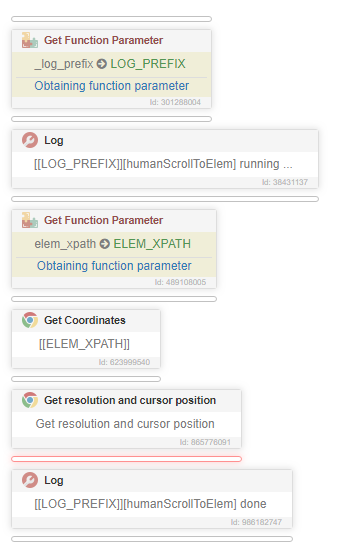
I need to scroll so that the element is vertically centered on the page at Y position.
I have an element located at [[ELEM_XPATH]].
The parameters for that element include:- ELEM_X: Integer value, offset relative to the current X window position.
- ELEM_Y: Integer value, offset relative to the current Y window position.
- ELEM_WIDTH: Integer value, offset relative to the current window position.
- ELEM_HEIGHT: Integer value, offset relative to the current window position.
It's essential to ensure that the element could be positioned at the top or bottom of the current browser view. Additionally, consider the scenario where the element is outside the current view, indicated by ELEM_Y < 0, signifying that the element is at the top of the current page but beyond the current view.
I also have information on the current resolution and cursor position:
- CURSOR_X: Current cursor coordinates X, relative to the screen position.
- CURSOR_Y: Current cursor coordinates Y, relative to the screen position.
- SCROLL_X: Current scroll X value. Combined with CURSOR_X, this value will give the absolute cursor position.
- SCROLL_Y: Current scroll Y value. Combined with CURSOR_Y, this value will give the absolute cursor position.
- BROWSER_WIDTH: Current browser viewport width, excluding space taken by the address bar or native window. Works the same as window.innerWidth.
- BROWSER_HEIGHT: Current browser viewport height, excluding space taken by the address bar or native window. Works the same as window.innerHeight.
Do not get any element params because you have them all. Create a loop where you continuously scroll a small random distance and check if the element is positioned correctly. This case also includes scrolling up on pages where ELEM_Y < 0.
-
Ого вау, просто красавчики , с АИ вообще интересно
-
-
Осталось научить его по сайтам серфить ))
Но пока как по мне балавство, лучше бы http клиент пропатчили, чтобы свои костыли не пихать.
-
Быстрый способ решить любые проблемы с антидетект https://community.bablosoft.com/topic/12198
-
@support интересно кто говорит про какие-то "ущемления" - у украинцев так же как и у россиян нету никакой платеги на оплату хотя разраб из Украины , о чем речь вообще , это смешно смотрится даже
интересно кто это может писать)
-
@support said in Выпущена 26.5.0 версия BrowserAutomationStudio:
Коммент вроде "лучше бы сделали фичу х" уже есть. Нужно еще написать "бас не работает, когда почините??" и что-то про ущемление прав русских. Пожалуйста, постарайтесь.
Возможно просто стоит прислушиваться к просьбам тех кто на постоянной основе занимается разработкой на БАС и знает в чем есть практическая необходимость, или хотя бы проводить какие-то опросы перед тем как пилить новые фичи. А то получается что люди годами просят то в чем болит, а вместо этого получают фичи, которые если и полезны то только для маркетинга.
-
@support said in Выпущена 26.5.0 версия BrowserAutomationStudio:
Пожалуйста, постарайтесь.
Я стараюсь тестить новую фичу, первым делом.
Потому что другие привычные инструменты уже имеют помощников в виде AI и я уже успел оценить их полезность для меня.
Выше написал что пытался сделать и что у меня не вышло. А пытался я это сделать, потому что в BAS нет прокрутки к элементу с эмуляций мыши в кубике Scroll To Element и судя по тому, что элемент должен быть виден на экране, то задумывался он совсем для других целей, чем мне надо.
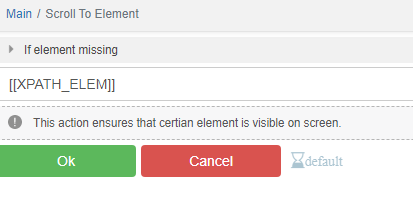
Как тут:
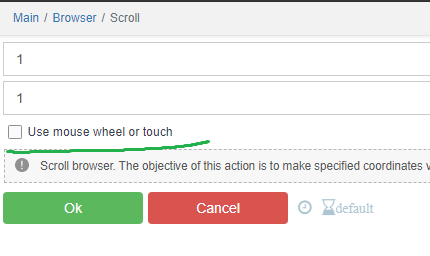
-
-
@UserTrue said in Выпущена 26.5.0 версия BrowserAutomationStudio:
@support said in Выпущена 26.5.0 версия BrowserAutomationStudio:
Коммент вроде "лучше бы сделали фичу х" уже есть. Нужно еще написать "бас не работает, когда почините??" и что-то про ущемление прав русских. Пожалуйста, постарайтесь.
Возможно просто стоит прислушиваться к просьбам тех кто на постоянной основе занимается разработкой на БАС и знает в чем есть практическая необходимость, или хотя бы проводить какие-то опросы перед тем как пилить новые фичи. А то получается что люди годами просят то в чем болит, а вместо этого получают фичи, которые если и полезны то только для маркетинга.
Разработчик на своей волне двигаеться, движок апдейтит и на том спасибо.
-
@FastSpace said in Выпущена 26.5.0 версия BrowserAutomationStudio:
Разработчик на своей волне двигаеться, движок апдейтит и на том спасибо.
Так то оно так, но почему-то у меня складывается ощущение, что никто в команде разработчиков BAS не пользуется продуктом сам.
Если сесть и начать писать более или менее серьезный скрипт, сразу всплывают нюансы, то одного нет, то это не совсем так работает, как надо и так далее.
-
@support said in Выпущена 26.5.0 версия BrowserAutomationStudio:
Тестировались только запросы на английском. Другие языки могут работать, а могут и нет.
Возможно стоит прикрутить автоматический перевод Deepl, пишем на русском промт улетает на английском.
-
@sergerdn said in Выпущена 26.5.0 версия BrowserAutomationStudio:
Так то оно так, но почему-то у меня складывается ощущение, что никто в команде разработчиков BAS не пользуется продуктом сам.
Я думаю они в курсе о многих потребностях, но @support не спрашивает их мнения ) А они просто наемных сотрудники...
-
Фишка с ии врядли будет полезна опытным пользователям, но для новичков возможно да. Регулярки помогает делать, гуд. Попробовал простое задание типо спарси товары с этой страницы - структуру набивает верно - но селекторы все неверные. А если копать селекторы, то проще по моему самому структуру сделать. Но поживем посмотрим.
Ну и побольше бы примеров промтов - так как у меня например не особо фантазии хватило, чтоб еще такого у него попросить.
А вот @UserTrue верно попросил - было бы здорово, если бы наконец пропатчили библиотеку curl - сто раз просили на форуме. Речь об этом https://github.com/lwthiker/curl-impersonate
Ну и думаю если спросить @UserTrue он поделится подробной информацией что там еще можно докрутить.