Your browser does not seem to support JavaScript. As a result, your viewing experience will be diminished, and you have been placed in read-only mode.
Please download a browser that supports JavaScript, or enable it if it's disabled (i.e. NoScript).
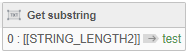
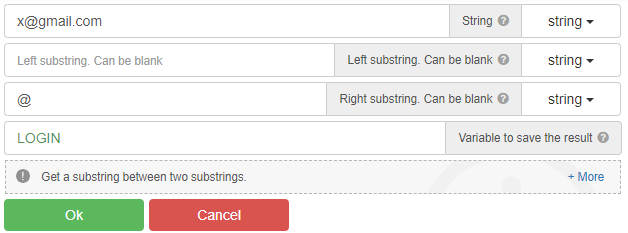
For example, when you run this code on "x@gmail.com", it only gets "x".
What should I do to get the text after the "@" sign, that is, "gmail.com"?
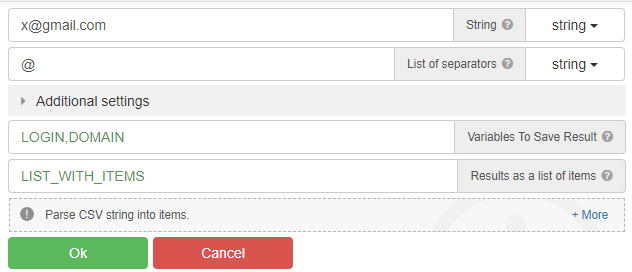
"parce csv" - action
Using Substring
@radb0310
This only captures the "x" before the "@" sign.
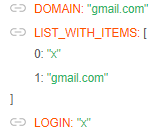
@clepro, use the "Parse CSV string" action
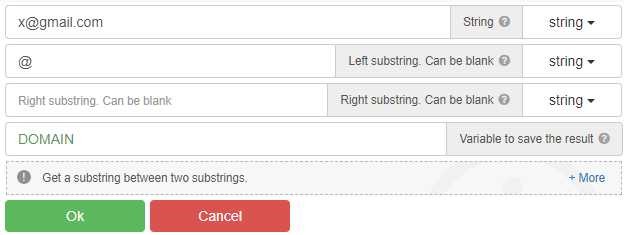
You can also use the "Get substring between" action, and many other actions...
@GhostZ
thanks. It worked as you said.
sure you can use it
As this is way too complicated with BAS and no one has an idea how to solve it I simply built my needed bot with Zennoposter and finished it in no time.
@umut-tekin 0_1556658948945_2019-05-01_001540.png
Сделайте GET запрос с адресом http://api.proxies.lol/?apiKey=123456 и вы должны получить ваши прокси.
0_1556659144681_2019-05-01_001852.png