Your browser does not seem to support JavaScript. As a result, your viewing experience will be diminished, and you have been placed in read-only mode.
Please download a browser that supports JavaScript, or enable it if it's disabled (i.e. NoScript).
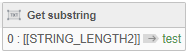
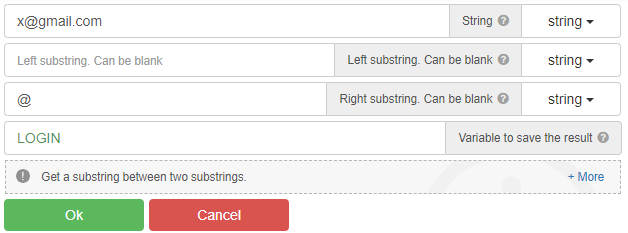
For example, when you run this code on "x@gmail.com", it only gets "x".
What should I do to get the text after the "@" sign, that is, "gmail.com"?
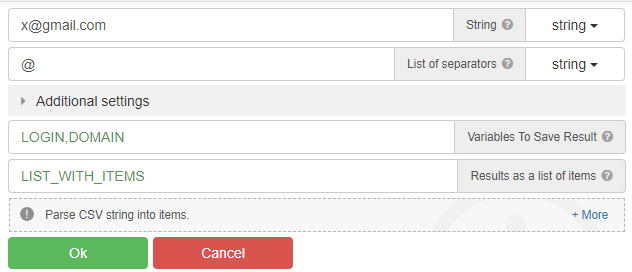
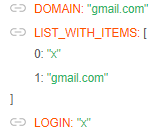
"parce csv" - action
Using Substring
@radb0310
This only captures the "x" before the "@" sign.
@clepro, use the "Parse CSV string" action
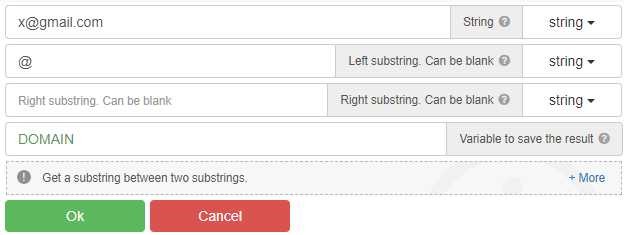
You can also use the "Get substring between" action, and many other actions...
@GhostZ
thanks. It worked as you said.
@pirkhezr you can try use cycle, where you checking selectors by [[IS_EXIST]]
nope. last days no changes.
@rekaa0251 it should work, but there is no newapi method for dbc, it is better to use 2captcha, you will save a lot of money.
@modournation said in Use spotify web player:
@f1kus you need widevine support. Without widevine support spotify will not work.
Hello i have same problem what is widevine support