Your browser does not seem to support JavaScript. As a result, your viewing experience will be diminished, and you have been placed in read-only mode.
Please download a browser that supports JavaScript, or enable it if it's disabled (i.e. NoScript).
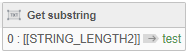
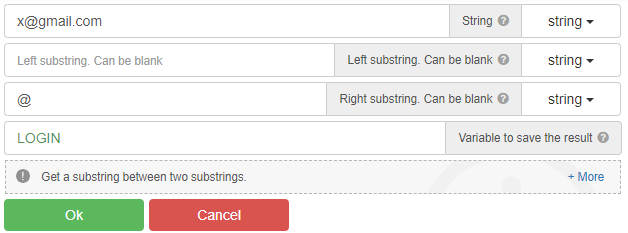
For example, when you run this code on "x@gmail.com", it only gets "x".
What should I do to get the text after the "@" sign, that is, "gmail.com"?
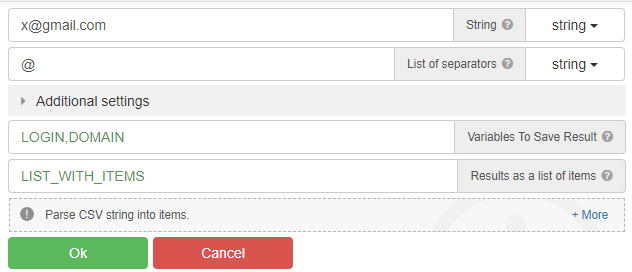
"parce csv" - action
Using Substring
@radb0310
This only captures the "x" before the "@" sign.
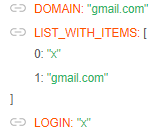
@clepro, use the "Parse CSV string" action
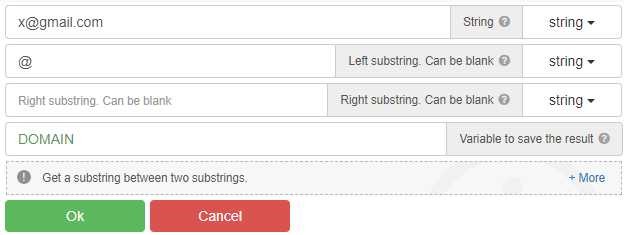
You can also use the "Get substring between" action, and many other actions...
@GhostZ
thanks. It worked as you said.
@Roy-Mustang For a Website traffic..
@halilhrm0618 никак, 1 прокся == 1 поток
@juniperberry
b2e14364-c4da-4bf0-b677-009064ab0059-image.png
@amirsyazi said in Save cookies in Chrome to use in BAS:
@Fox thanks for the thread link .. and i have check the script it only convert from BAS cookies to editThisCookies format.. need help to convert from editThisCookies format to BAS cookies format anyone..?
@Fox thanks for the thread link .. and i have check the script it only convert from BAS cookies to editThisCookies format..
need help to convert from editThisCookies format to BAS cookies format anyone..?
See the same topic
Seems to be a bug, if you have tunneling enabled it leaks your ip and if you disable tunneling you can't continue to click to next page on some urls, seems to be a bug.