


Your browser does not seem to support JavaScript. As a result, your viewing experience will be diminished, and you have been placed in read-only mode.
Please download a browser that supports JavaScript, or enable it if it's disabled (i.e. NoScript).
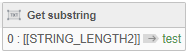
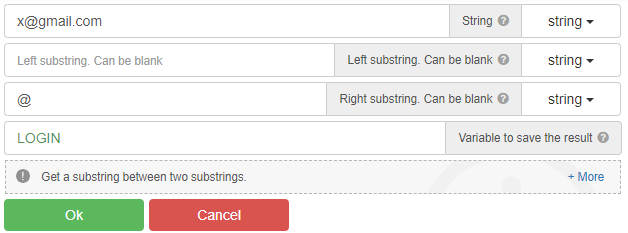
For example, when you run this code on "x@gmail.com", it only gets "x".
What should I do to get the text after the "@" sign, that is, "gmail.com"?
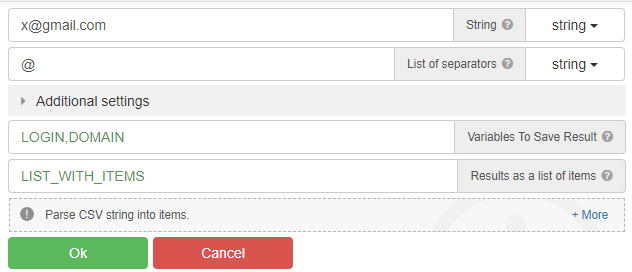
"parce csv" - action
Using Substring
@radb0310
This only captures the "x" before the "@" sign.
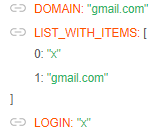
@clepro, use the "Parse CSV string" action
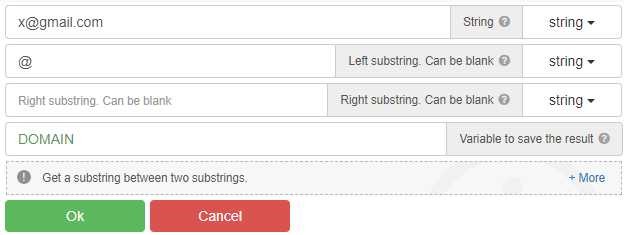
You can also use the "Get substring between" action, and many other actions...
@GhostZ
thanks. It worked as you said.
@Roy-Mustang 839ee6e6-f3d1-4cb7-adec-8fdbb56769d8-image.png
thanks for helping me, can you provide a screenshot in using http/xml example, i have tried but it doesn't work, thanks
@spockthe40oz pm
Seems to have to do with "add tab" When not having proccess tunneling activated i can't add any tabs.
Easy.. if u have resource like first name, last, city etc then.. in yout login field just tell BAS to write:
<firstname><lastname><AnyDigit><AnyDigit><AnyDigit><AnyDigit> <firstname><lastname>199<AnyDigit> etc.. or
{{firstname}}{.| }{{{lastname}}|{{year}}}